• About Heli

HeliFromFinland

~ Heli's thoughts on Machine Learning, AI, AI Agents, Database Designing, Oracle SQL Developer Data Modeler, User Groups and much more

HeliFromFinland

Author Archives: Helifromfinland

How to create a bitmap index?

03 Friday Jun 2016

Posted by Helifromfinland in Data Modeler

≈ Leave a comment

Because a bitmap index is an Oracle specific feature that can only be done in the Physical Model for Oracle RDBMS.

You define the indexes in Relational Model. First go to Table Properties of the table you want to create an index for and press the green plus. Add the information needed.

Index1

Then in Physical Model (for Oracle RDBMS) select that index and define it as bitmap index.

index2

When generating the DDL, you will get something like this:

CREATE BITMAP INDEX Orders_Customer_CustNO_IDX ON Orders
(
Customer_CustNO ASC
)
LOGGING ;


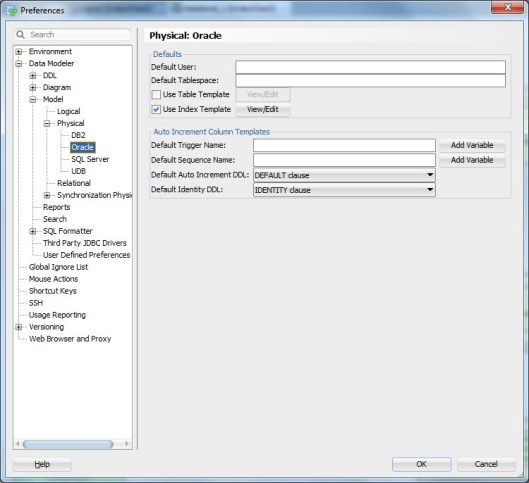
Note: If you want ALL your indexes in Oracle RDBMS to be bitmap indexes, you can define a template for indexes and set bitmap as a default. First enable the defaults for Oracle Physical Models Index Templates in Preferences:

3bitmap1

Then set (Press View/Edit) the default for Bitmap Index as YES.

3bitmap2


How to generate an index automatically for a Primary/Foreign or Unique Constraint?

03 Friday Jun 2016

Posted by Helifromfinland in Data Modeler

≈ Leave a comment

I have defined Primary Key, Unique Key and Foreign Key Constraints and I know I want to have indexes for them. Do I really need to go and define them one by one in Data Modeler? Not necessarily.

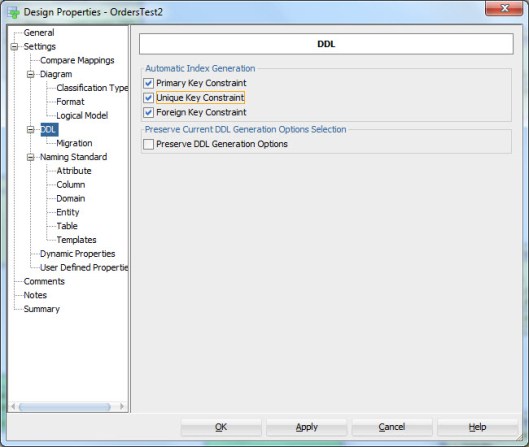
Go to Design Properties (double-click the name of the design or right-click and select Properties). Enable all or those you want from Automatic Index Generation.

2bitmap1

Now when you generate the DDLs, the DDLs for generating these indexes will be generated automatically.

How are those automatically generated indexes called? You can define that also in Design Properties as the template for Automatic Index.

2bitmap2


#AMIS25

03 Friday Jun 2016

Posted by Helifromfinland in Events

≈ Leave a comment

First of all congratulate AMIS! 25 years is a great achievement!

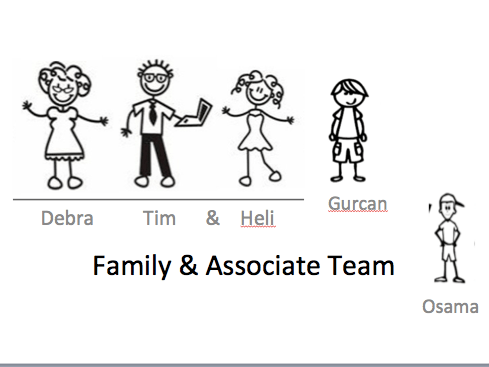
I just attended the #AMIS25 event. On Wednesday we had a hackathon organized by OTN for ACEs. Later the name of the event was changed to OTN Cloud Developer Challenge and a challenge it was 🙂 My team was Oracle Family and the Associates including my Oracle Dad Tim Hall, my Oracle Mom Debra Lilley, Gurcan Orhan and Osama Mustafa. Gurcan was our team leader and Osama Mustafa missed the whole fun because of visa issues.

OracleFamilyTeam

We built a demo application for speakers for OTN Tours to tell who will be attending, which flights and which hotels they have booked etc. I really hope we will finish building this application because it definitely would be extremely useful! Thank you to OTN for organizing and thank you to my team for all the fun! For instance I now know how to build REST Services (I built quite many of those 🙂  ).

After we finished the challenge the AMIS25 started with a welcome reception.

On Wednesday morning we were ready to start the official event. I gave two talks: one on my favorite features of SQL Developer and another one on how to manage changes in structures of database objects. Both my sessions were well attended (even though Jonathan Lewis was speaking at the same time as I gave my second presentation 🙂  ). Thank you very much for attending!

Thank you Lucas Jellema for inviting me! Once again congratulate AMIS and thank you for a great event! Now I am on my way to Bulgaria for the BGOUG…


– – Heli


How to create a Physical Model?

01 Wednesday Jun 2016

Posted by Helifromfinland in Data Modeler

≈ Leave a comment

I have designed the Logical Model, pressed the double-arrow (Engineer to Relational Model) to get the Relational Model. Now I am ready to create a Physical Model for that Relational Model but how to do it?

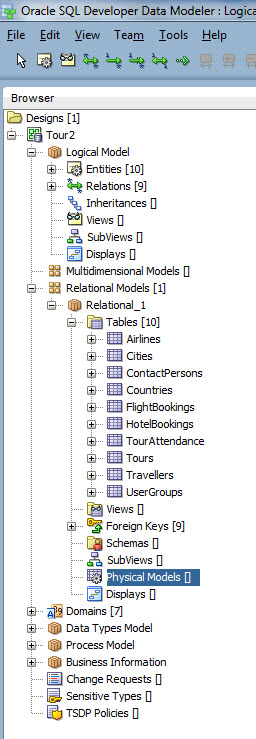
In Browser, under your Relational Model, select Physical Models.

Phys1

Right-click and select New.

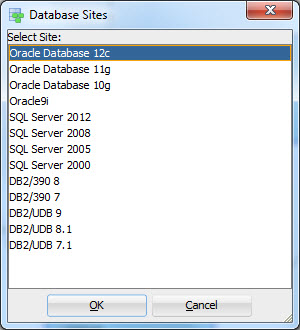
Then select the RDBMS and the version you want for a Physical Model (in Data Modeler terminology it is the Database Site).

Phys2

That’s it. You now have the Physical Model for the Relational Model. Note that you can have several Relational Models for one Logical Model and several Physical Models for one Relational Model, if needed.


NOTE: The Physical Model is not opened automatically when you open a design (for performance reasons). Go to the same Physical Models, right-click and select Open.


Stored Procedures, Functions, Packages and Data Modeler

31 Tuesday May 2016

Posted by Helifromfinland in Data Modeler

≈ Leave a comment

Quite often I hear a question: can I design my stored PL/SQL with Data Modeler too? I want to design the privileges etc. and I feel I should do it in Data Modeler.

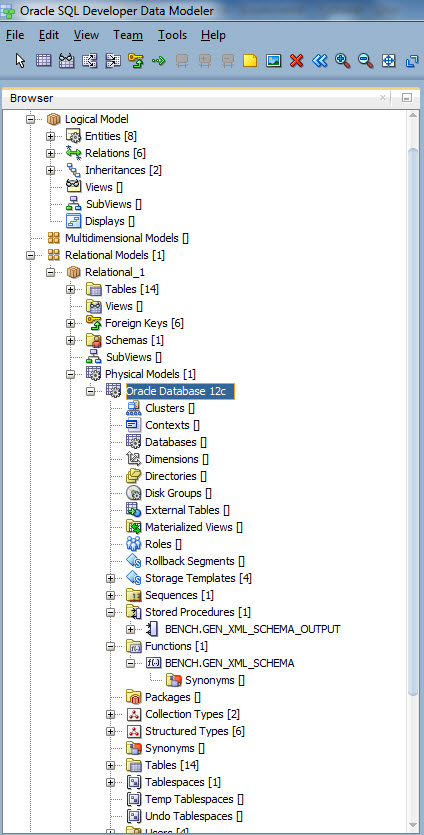
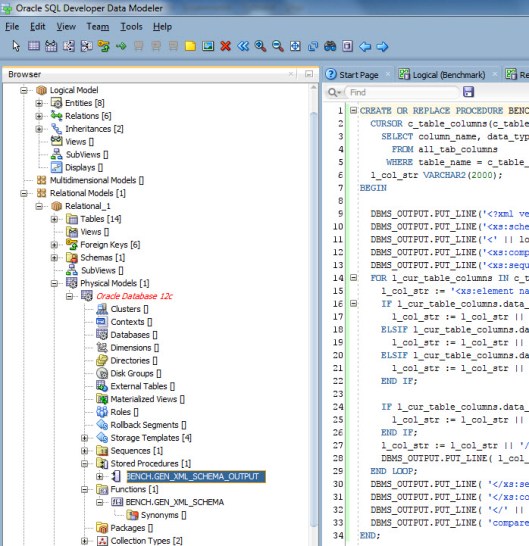
You are right: you should. Any code that is stored in the database is a database object just like a table or a view and should be designed and managed. But because a stored PL/SQL is an Oracle specific feature you can only find them in Physical Model in the Browser.

Browser

You can edit a Stored Procedure by right-clicking and selecting Edit.

edit


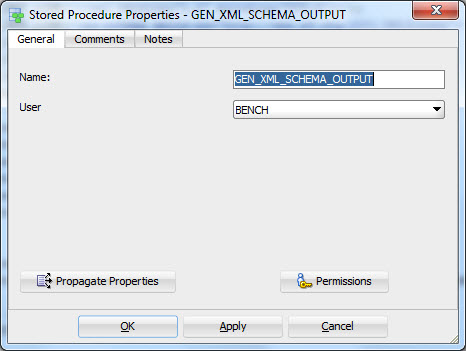
And you can define the Properties and Privileges by double-clicking the name or right-clicking and selecting Properties.

Properties


Sometimes it is somebody else in the project that manages the content (logic) of the code or you rather use SQL Developer for it. Then the best way is simply reverse engineer the code from either the DDL file or the Data Dictionary. You can do that by selecting File|Import|DDL File or File|Import|Data Dictionary.

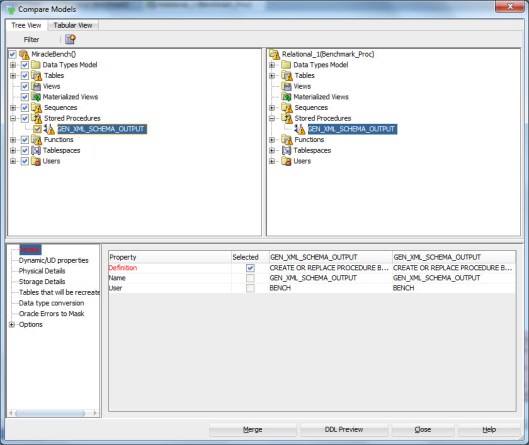
You can also compare the version of code you have in Data Modeler to the one in DDL or Data Dictionary. Simply select File|Import|DDL File or File|Import|Data Dictionary as you did while reverse engineering but since you already have the objects in you Physical Model instead of creating them the tool now shows how they are different from each other:

comp1

If you want to see the code that would be imported to the design, press DDL Preview. If you want to import the changes made to the version in DDL or Data Dictionary, press Merge.

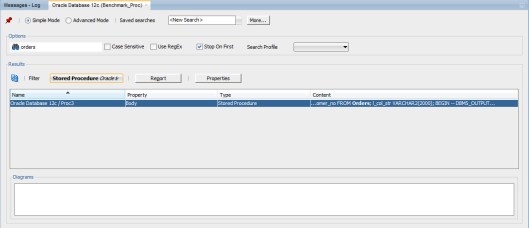
If I have my stored PL/SQL in Data Modeler, I am able to design and define the privileges for them. What else? For instance if I am changing the table Orders I can first check if I have any code that needs to be changed because of that. I do that using the Search functionality. Right-click on the name of your Physical Model and select Search.

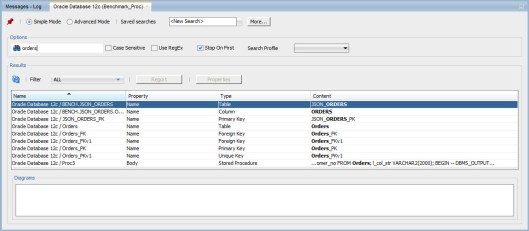
Type the table name you are planning to change and press Enter:

Search1

Select Stored Procedure from the Filter:

search2

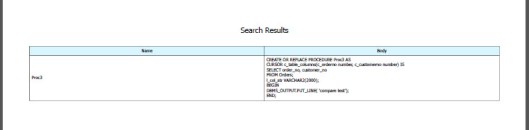
And using the Report button and a custom report template you can generate a report showing the code that might need change after your change in table structure:

result


Naming the Not NULL contraints with a Naming Standard Template

25 Wednesday May 2016

Posted by Helifromfinland in Data Modeler

≈ Leave a comment

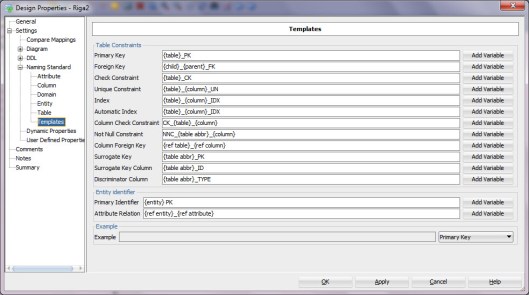
I have defined the naming standard for a NOT NULL Constraint in Design Properties (double-click the design name, Settings-> Naming Standards -> Templates) like this:

namingTemplates

How do I get my NOT NULL Constraints named as defined in the Template?

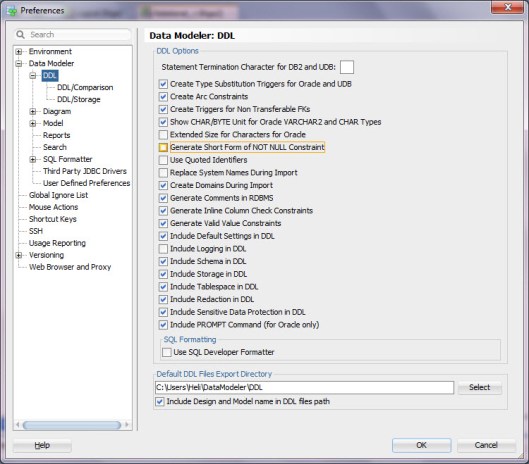
Check your Preferences.apply4Generate Short Form of NOT NULL Constraints must be turned off.


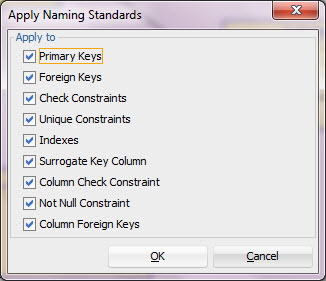
Then select the relational model from the Browser, right-click and select Apply Naming Standards to Keys and Constraints.applynamingstandars

Make sure to choose Not Null Constraints.

apply2

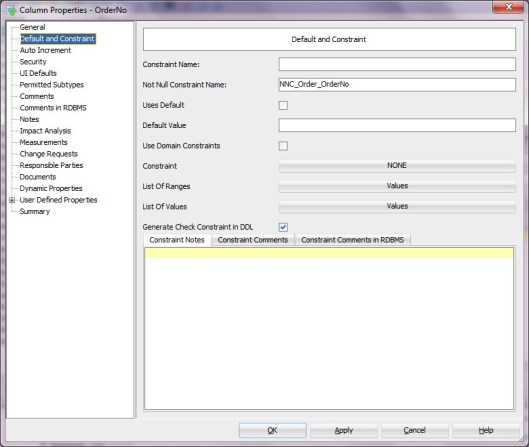
Now you can see the  names defined for the not null contraints in the Column Properties.

apply3

You can also see them defined in the DDL Preview.

apply5

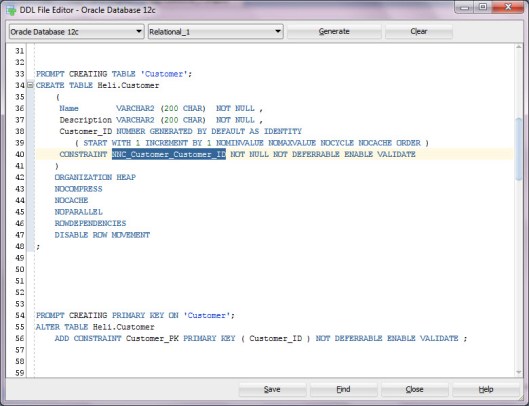
And in the DDL itself.

apply6


— Heli


Academic Life

25 Wednesday May 2016

Posted by Helifromfinland in Events

≈ Leave a comment

As some of you might already know, I have started my PhD studies at the University of Helsinki. My research area is Big Data and Unified Databases. It has been extremely interesting but the highlight so far was last week: the 32nd IEEE International Conference on Data Engineering (ICDE  2016) was held in my home town, Helsinki. I was not just attending and working as a volunteer but I was also chairing one of the conference sessions: Research 6B: Analytics on Big Data (http://icde2016.fi/pre_program.php#Q1-1-196)! On Monday I was attending and web co-chairing/coordinating the First Europe-China Workshop on Big Data (http://udbms.cs.helsinki.fi/BigData2016/). On Friday I was attending and assisting with the Workshop on Keyword Search and Data Exploration on Structured Data, KEYS 2016, (http://keys2016.cs.helsinki.fi/).

That was a busy week but I could not find a better way to get to know the academic world! It was an amazing week!

Defining constraints for a Domain

10 Tuesday May 2016

Posted by Helifromfinland in Data Modeler

≈ 16 Comments

Using Domains is very wise: you only need to define the datatype and constraints once for a type of information. For instance username, money, or Boolean values. But how can I define a Domain with Oracle SQL Developer Data Modeler and how to use a domain?

Defining a Domain

Select Domain Administration from the Tools menu.

Press Add, define a Name, Logical type etc. for the Domain.
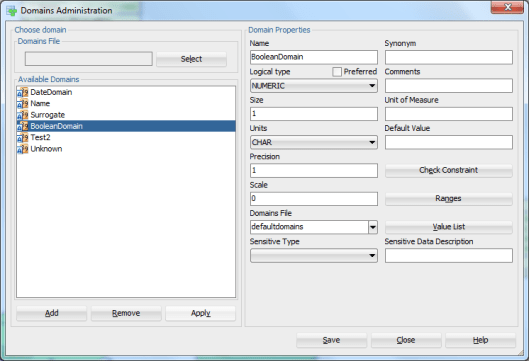
pic1

Press Apply and Save.


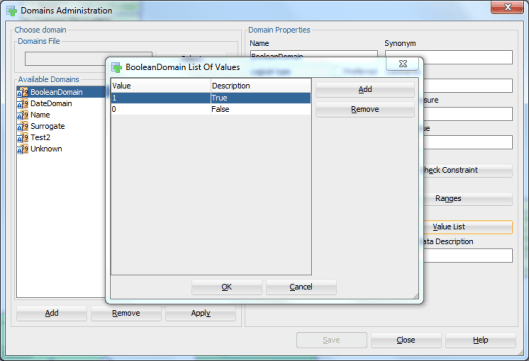
What if I want to define a constraint for columns of type BooleanDomain that can only have values 0 or 1?

Select the Domain you want to modify and press Modify. Press Value List.
pic2

Press Add and add the Values wanted and their Descriptions.

Press OK. Press Apply (to confirm the modification to the Domain).


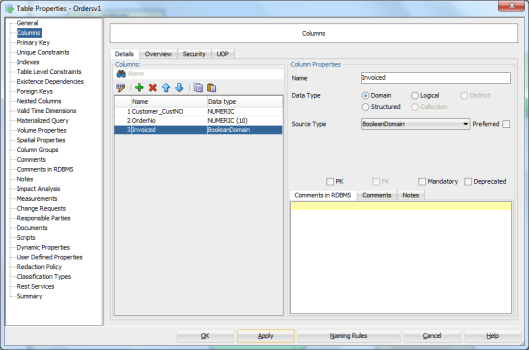
To specify an attribute or a column with that Domain select Domain as Data Type and your domain from the list. Apply.
pic3


Now when you generate the DDLs for the table the column will be of the type defined in the Domain

CREATE TABLE Orders_Test

(

Customer_CustNO NUMBER (10) NOT NULL ,

OrderNo         NUMBER (10) NOT NULL ,

Invoiced        NUMBER (1)

) ;

And there will also be the DDL for defining the constraint:

ALTER TABLE Orders_Test ADD CHECK ( Invoiced IN (0, 1)) ;


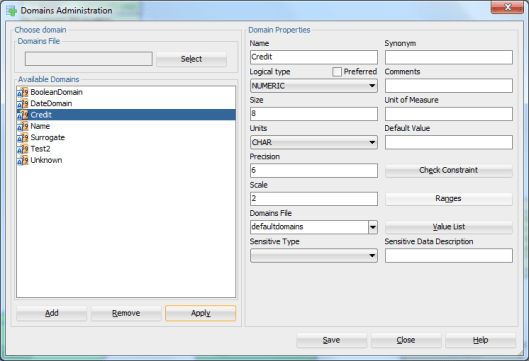
What if I want to define a constraint ‘between 0-100 000’ for a Domain?

Define the domain Credit as explained earlier but instead of defining a Value List now press Ranges button.
pic4

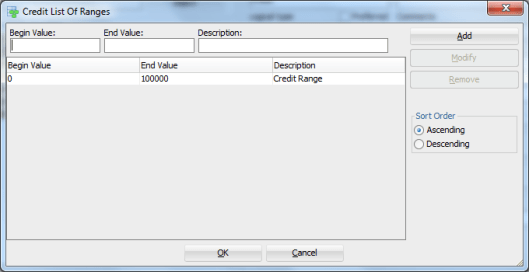
Define the Begin Value (0), the End Value (100000) and the Description (Credit Range). Press Add.
pic13


Then define an attribute or a column using this Domain as a Data Type.
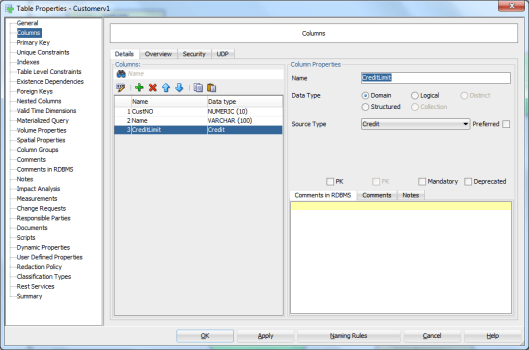
 

pic5

Now the DDLs you get will have all you defined in the Domain: the data type and the constraint:


CREATE TABLE Customers_Test

(

CustNO      NUMBER (10) NOT NULL ,

Name        VARCHAR2 (100) NOT NULL ,

CreditLimit NUMBER (6,2)

) ;

ALTER TABLE Customers_Test ADD CHECK ( CreditLimit BETWEEN 0 AND 100000) ;


This is all great but what if I want to define a check constraint with other kind of definition but a list or a range?

Defining a Check Constraint

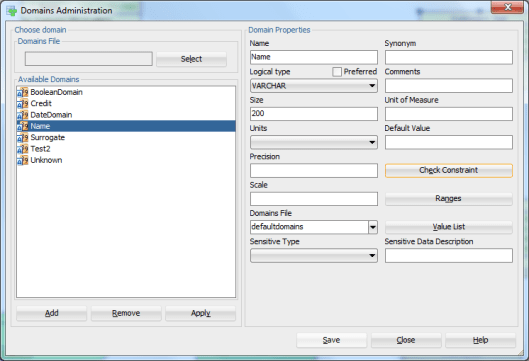
Let’s define a Domain Name.
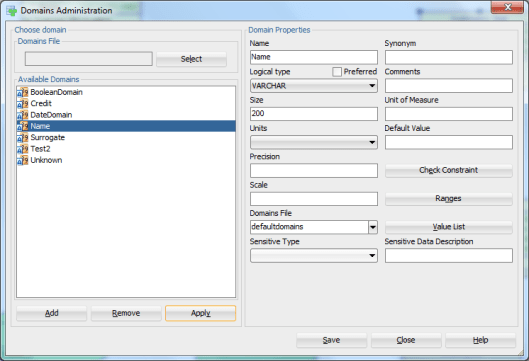
pic6

Whenever this Domain is used we want the column to be NOT NULL. Press Check Constraint.

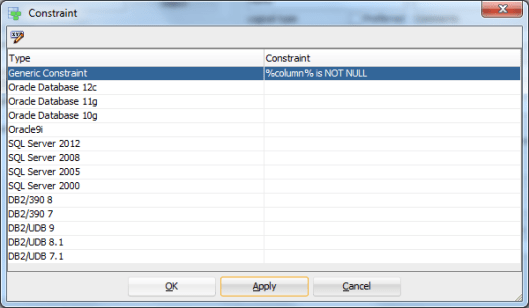
If you want to define different constraints to different RDBMS types you can do that by clicking the Constraint field next to the technology chosen. If you want to define a generic constraint, select the Constraint field next to Generic Constraint.
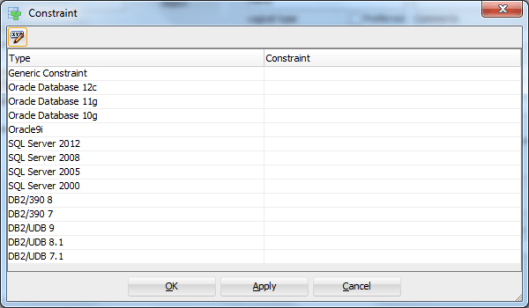
pic7


Define the constraint using %element% notation:

pic8

Press OK.


pic9

Then Apply and OK.

pic10

Apply and Save.


Define an attribute or a column with a Domain Name.
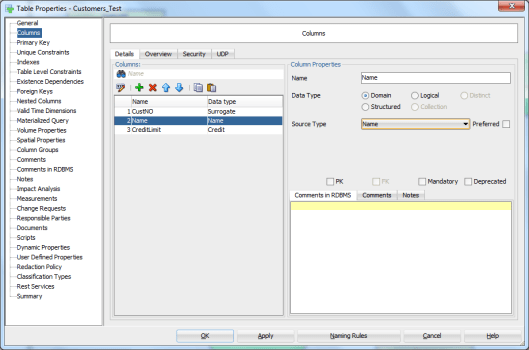
pic11

And the DDLs


CREATE TABLE Customers_Test

(

CustNO      NUMBER (16) NOT NULL ,

Name        VARCHAR2 (200) ,

CreditLimit NUMBER (6,2)

) ;

ALTER TABLE Customers_Test ADD CHECK ( Name IS NOT NULL) ;


This might be a bit silly example but just to show how you can define more complex constraints using a variable (%column% in our example).

NOTE that the constraint defined in our example is different from defining a column mandatory (ALTER TABLE Customers_Test MODIFY (Name NOT NULL)) but the effect is the same: you cannot insert a row in that table without giving a value for the column Name.

Name             Null                Type

———– ——– ————-

CUSTNO      NOT NULL     NUMBER(16)

NAME                                    VARCHAR2(200)

CREDITLIMIT                      NUMBER(6,2)


In User_Constraints view you will find a constraint defining this column NOT NULL:

“HELI”   “SYS_C0014723”               “C”         “CUSTOMERS_TEST”      ” Name IS NOT NULL”    ” Name IS NOT NULL”    “”                “”            “”            “ENABLED”         “NOT DEFERRABLE”         “IMMEDIATE”    “VALIDATED”     “GENERATED NAME”                “”            “”            10.05.2016           “”            “”            “”            “”            3


And you cannot add a row without any value to the Name column:

  1. 00000 – “check constraint (%s.%s) violated”

*Cause:    The values being inserted do not satisfy the named check

*Action:   do not insert values that violate the constraint.


NOTE: You can also define a Default Value for a Domain. And if you have defined a Value List for that Domain the value can be chosen from that list.
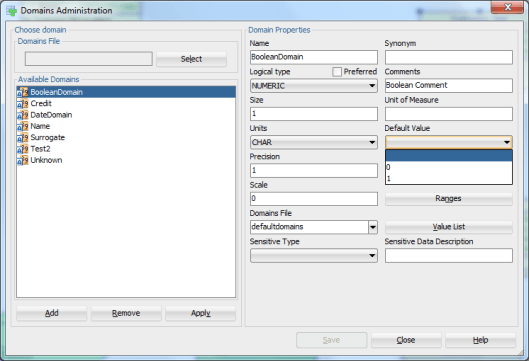
pic12

CREATE TABLE Orders_Test
(
Customer_CustNO NUMBER (10) NOT NULL ,
OrderNo         NUMBER (10) NOT NULL ,
Invoiced        NUMBER (1) DEFAULT 0
) ;


APEX Connect 2016, “The Pink Conference”

29 Friday Apr 2016

Posted by Helifromfinland in Events

≈ Leave a comment

This week I attended my first specifically APEX conference, APEX Connect in Berlin, Germany. Remember the Berlin Wall?

IMG_4886

Our hotel was on the East side. I am sure I will remember this hotel FOREVER. Why? Guess.. 🙂


IMG_4872
IMG_4873
IMG_4890
IMG_4937


The first day started with a welcoming speech by Niels de Bruijn and his team. And then the stage was taken by “Tom” Chris Saxon. Chris gave a excellent talk about his experience on working on AskTom. My first talk was at 12.00 about Managing the changes in database structures in agile project with Oracle SQL Developer Data Modeler. It is not easy to compete with lunch but almost a room full of people chose my presentation from lunch 🙂 Thank you so much for attending!

Before my next talk I attended Alex Nuijten’s Analytic Functions: Unleash the SQL Power, even though he was telling me not to. His excuse was that I have seen this session already. So what! Alex is a great presenter and I always learn new things in his sessions.

At 4.15 pm I was supposed to give a workshop on Top 10 Features of SQL Developer everybody should use. I say supposed because the room was getting fuller and fuller, more chairs were brough in and finally it was so full there was no extra space. I decided to just demo the features and give the slides to the audience to do the workshop part at home. I also agreed with the organizers (DOAG) that I will give this session in November at the DOAG event so that those who missed it this time will have a new chance to see it. Thank you very much for attending and thank you for all the questions and ideas!

The next morning started with the announcement of the winners of “APEX BI competition”. Congratulations to all the winners AND to all the attendees! Next it was the godfather of APEX, Mike Hichwa, sharing his thoughts of the APEX Vision; past, present and future. Mike is a great presenter and he definitely knew what he was talking about. Great keynote! After that I listened David Peake telling about the New Features in Oracle Application Express 5.1. As usual David was showing great demos for a full room. I could not get a seat so needed to listen the presentation standing 🙂

One of my favourite speakers is also Roel (“Rule”) Hartman. He knows what he is talking about and makes the audience believe they have understood everything 🙂 I went to see the presentation: Make your APEX Applications fly using JET components.

I though the day was perfect but no. The last keynote was simply amazing. Monkey See Monkey Do: Monkey Business at the work floor by Patrick van Veen. Using experiments with monkeys he explained human behaviour and gave great advice to IT projects, work and the whole life. Total Monkey Business!

IMG_4920

After the monkeys it was time for a party! Dinner, show and plenty of music and fun!

The last day was full of great sessions. Of course I attended the sessions by Roel (APEX Developers: Do more with Less!!) and Alex (Structuring an APEX application). BTW I must attend all the session by Alex from now on: when I am in the room he remembers to tell the audience the right things  😉 If you add a new column, fill it up and change it to mandatory,…if you want to avoid performance problems, design your database,… 🙂

I also attended the session by Christian Rokitta, Lunchtime learn Q&A (which turned out to be lunch OR learn 🙂 ) and An Update to Universal Theme by Shakeeb Rahman.

Thank you all the organizers (GREAT WORK!) and thank you all who attended my sessions! Great event! Amazing community! I really, really hope I will be invited next year again!


— Heli

#WIT at #C16LV

18 Monday Apr 2016

Posted by Helifromfinland in Events

≈ Leave a comment

At COLLABORATE16 I gave my very first WIT talk. I have attended several panels on WIT, I have been mentoring etc. but never given a full talk about WIT. I was quite nervous before my presentation: what could I say that my audience would find interesting?!

I arrived very early to my room as did Anita, the representative for the sponsor. We had a great chat before the session started. The room was packed and I was told that there was a waiting list for another full room!  And not just women, plenty of men as well which I find great. Obviously WIT is a hot topic in USA. I am very glad COLLABORATE has noticed that and is giving the audience what they want.

I gave my talk and got plenty of questions during and after the session. And during the whole event people came to talk to me and said how much they enjoyed my session! That was a wonderful feeling.

Based on what I was asked and talked about it would say that the main concern for many of us are our children. We do not worry about the career and that kind of things as much as we worry about our children, no matter what age they are. Of course my audience was people already on IT so the concern for those who are not on IT but would like to be are different. And when I say we I mean both women and men.


Thank you COLLABORATE for inviting me and giving me the chance to give my first WIT talk!


— Heli

← Older posts
Newer posts →

Subscribe

  • Entries (RSS)
  • Comments (RSS)

Archives

  • December 2025
  • October 2023
  • October 2022
  • October 2021
  • April 2020
  • October 2019
  • October 2018
  • June 2018
  • December 2017
  • October 2017
  • September 2017
  • July 2017
  • April 2017
  • March 2017
  • February 2017
  • January 2017
  • December 2016
  • November 2016
  • October 2016
  • September 2016
  • August 2016
  • July 2016
  • June 2016
  • May 2016
  • April 2016
  • March 2016
  • February 2016
  • December 2015
  • November 2015
  • October 2015
  • September 2015
  • August 2015
  • July 2015
  • June 2015
  • May 2015
  • April 2015
  • March 2015
  • January 2015
  • December 2014
  • November 2014
  • October 2014
  • September 2014
  • August 2014
  • June 2014
  • May 2014
  • April 2014
  • January 2014
  • December 2013
  • November 2013

Categories

  • Data Modeler
  • Database design
  • Events
  • General
  • Machine learning and AI
    • AI Agents
  • Oracle
  • SQL Developer

Meta

  • Create account
  • Log in

Create a free website or blog at WordPress.com.

Privacy & Cookies: This site uses cookies. By continuing to use this website, you agree to their use.
To find out more, including how to control cookies, see here: Cookie Policy
  • Subscribe Subscribed
    • HeliFromFinland
    • Join 53 other subscribers
    • Already have a WordPress.com account? Log in now.
    • HeliFromFinland
    • Subscribe Subscribed
    • Sign up
    • Log in
    • Report this content
    • View site in Reader
    • Manage subscriptions
    • Collapse this bar
 

Loading Comments...