• About Heli

HeliFromFinland

~ Heli's thoughts on Database Designing, Oracle SQL Developer Data Modeler, User Groups etc.

HeliFromFinland

Author Archives: Helifromfinland

DDL Generation

12 Tuesday Jul 2016

Posted by Helifromfinland in Data Modeler

≈ 2 Comments

After you have designed your database you need to get the DDLs to be able to create the database objects. When generating the DDL scripts with Data Modeler you have two choices: generate just a single file or several files. Depending on your processes and your current need one of these could be much better option than the other.

To generate the DDLs select Export, DDL File from the File Menu:

Export1


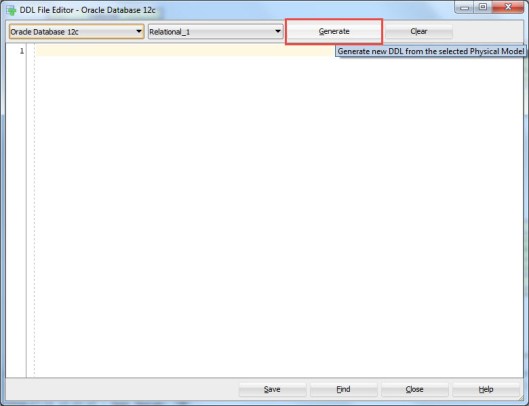
Then select the RDBMS you want to generate the DDL for (Oracle, SQL Server or DB2 and the right version of it, in Data Modeler that is called a Database Site) and the relational model wanted. Press Generate.

Export2

Now select the objects you want to generate the DDLs for.

Export3

And with the selection in Generate DDL in Separate Files you define whether the DDL will be a single file (not selected) or generated in separate files (selected).

If you select Generate DDL in Separate Files and press OK, you are asked for the directory where the DDL files will be saved:

Export4

Select that and in that directory you will have several new subdirectories:

Export45

Each of these subdirectories will include files for creating an object of that type. For instance the Table subdirectory might look something like this:

Export5

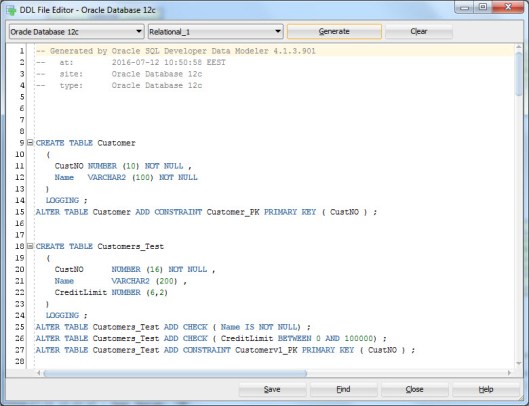
Whether you chose Generate DDL in Separate Files or not, you will have one single DDL file shown in the tool:

Export6

and you can save that as a single file by pressing Save.

In short: if you do not select Generate DDL in Separate Files you will have the DDL in one file and you can either save it or not. If you select Generate DDL in Separate Files you will automatically have the several DDL files saved in the directory you have specified and you can save the single DDL file if you want.

Note: if the physical model is not open the DDLs will be very general without any physical properties. If the physical model is closed the DDL might look like this:

CREATE TABLE Customer
(
CustNO NUMBER (10) NOT NULL ,
Name   VARCHAR2 (100) NOT NULL
) ;
ALTER TABLE Customer ADD CONSTRAINT Customer_PK PRIMARY KEY ( CustNO ) ;

And if it is open it might look something like this:

CREATE TABLE Customer
(
CustNO NUMBER (10) NOT NULL ,
Name   VARCHAR2 (100) NOT NULL
)
PCTFREE 10 PCTUSED 40 TABLESPACE TableSpace1 LOGGING STORAGE
  (
    PCTINCREASE 0 MINEXTENTS 1 MAXEXTENTS UNLIMITED FREELISTS 1 FREELIST GROUPS 1 BUFFER_POOL DEFAULT
  ) ;
ALTER TABLE Customer ADD CONSTRAINT Customer_PK PRIMARY KEY ( CustNO ) ;


Data Modeler and JavaScript

12 Tuesday Jul 2016

Posted by Helifromfinland in Data Modeler

≈ 4 Comments

A good skill to have with Data Modeler is JavaScript: using that you can change the way the tool works and you can automate many things. Where can I use those skills? There are two places in Data Modeler: Transformations and Table DDL Transformations.

Transformations

Transformations

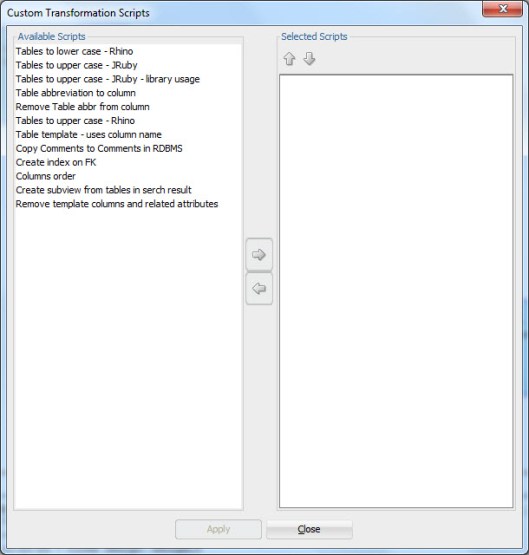
Transformations can be used to change the design. For instance while Engineering to Relational you could add columns to a table. Usually those columns are of a type of technical columns (for example creator, created, modifier, modified), or columns that should always exist for a type of table based on the methodology used (for example Data Vault defines certain columns to exist for certain kinds of tables: hubs, links and satellites). Or you can use them anywhere in your design to automate changes. To execute a script right-click on the Browser and select Apply Custom Transformation Scripts:

ApplyTransScripts1

Select the script/scripts from the list and press Apply:

ApplyTransScripts2

In short: Transformations are used to change the design programmatically.


Table DDL Transformations

TableDDLTransformations

Table DDL Transformations can be used to change the DDL Data Modeler generates. The design itself is not changed, only the DDL script. This can be used for example to generate the journaling mechanism (journaling tables and triggers) or DDL scripts for a RDBMS that is not supported by Data Modeler, for instance MySQL.

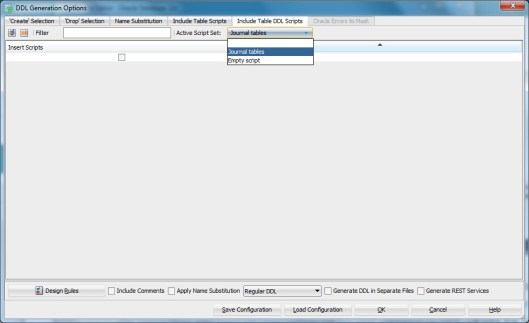
To use a script defined select it from the list in DDL Generation:

TableDDL1

Define the tables that DDL generation you want to be affected by the script:

TableDDL2

And Generate the DDL by pressing OK.

In short: Table DDL Transformations are used to change the DDL generated.


#KScope16

11 Monday Jul 2016

Posted by Helifromfinland in Events

≈ Leave a comment

One of my fav events and a must to attend is definitely KScope. This year it was held June 26-30 in Chicago which was a perfect location for me: never been there and have a direct flight from Helsinki 🙂

Chicago2

The reason I write this post so late is that at the end of the event I managed to catch a flu and have been a bit slow and quiet. Now I am fine again 🙂

KScope always starts with a Community Service Day on Saturday but unfortunately I always miss it. The reason is that on Friday we have the biggest celebration (mid-Summer) of a year in Finland and I simply cannot miss that! Sunday is a day for Symposiums and that is something I always attend. Also this year. I am glad that it has been made possible for attendees to attend any of those tracks and I usually jump from one symposium to another during the day and learn about many different areas.

This year I had two session: Managing the Changes in Database Structures Using Oracle SQL Developer Data Modeler and a Thursday Deep Dive: Database Design for Developers.

Chicago_Heli

(Thank you Bryn Llewellyn for the photo!)

I also moderated the database panel and a WIT roundtable. Thank you for attending my sessions and especially thank you to my wonderful panel: Kim Berg Hansen, Robert Lockard, Cary Millsap and Björn Rost. You were amazing! And a special thank you to Cary for this:

Chicago_Cary

You really made my day!

One of the hightlights of KScope is the Wednesday party. This time it was held in the Museum of Science and Industry. What a party!

Chicago3

Thank you ODTUG! It was an amazing event! Bye-bye Chicago

Chicago

See you all next year in San Antonio! (http://www.kscope17.com/)


Sensitive Data

06 Wednesday Jul 2016

Posted by Helifromfinland in Data Modeler

≈ Leave a comment

You can also design your sensitive data using Data Modeler.

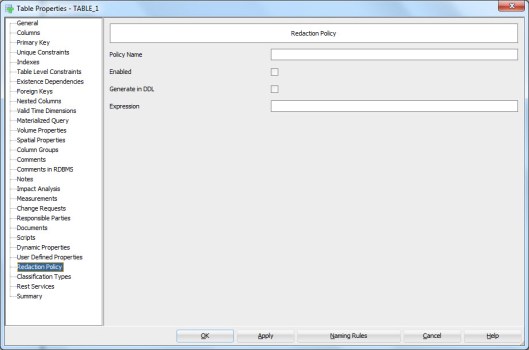
In table properties you can define a redaction policy for the table:

REdactionPOlicy

In column properties (double-click the column name in table properties or press the XYZ icon) select Security.

Security

In this tab you can design two main categories: Redaction and TSDP (Transparent Sensitive Data Protection).

In Redaction section you can define whether or not the column holds personally identifiable information (PII) (YES/NO), whether or not it holds sensitive information (YES/NO), the masking type used (FULL, NO, PARTIAL, RANDOM, REGEXP) and which masking template to use.

You can define your own masking templates by selecting Mask Templates Administration from Tools Menu:

MaskTemplates


After defining them they will be available in the list. Note that they must be of the same datatype as the column itself and of the same masking type selected to be seen on the list.


In TSDP section you can define the Sensitive Type used and type in the Sensitive Data Description.

You can define new sensitive types by right-clicking the Sensitive Types in Browser and selecting New Sensitive Type.

SensitiveTypes


And now back to the Column Properties and the Security Properties. In TSDP Section we can select a Sensitive Type created as a sensitive type for that column, as well as Masking Type and Mask Template:

SSNDef


You can also define sensitive type for a Domain:

SenTypeName


You can define new TSDP policies by right-clicking the TSDP Policies in the Browser and selecting New TSDP Policy:

TSDPPolicy

They can include Sub Policies:

SubPolicy

with Mask Types and Mask Templates etc.

You can also attach a Sensitive Type to the TSDP Policy:

TSDPSenType


After designing the sensitive data you might want to see a report of it.

The best way to do that is Search and Advanced Mode:

SSNReport

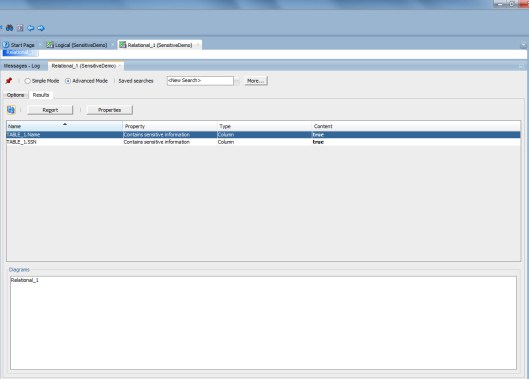
Select Contains sensitive information Property and true.

ReportResult

Now you can see all the columns that have been defined to hold sensitive data.

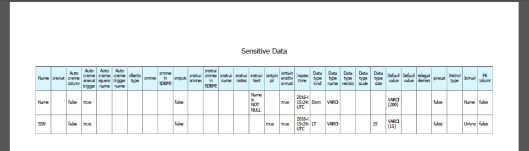
Press Report and select the format type preferred etc.

And here we are…

Report


#OUG_SCOT

23 Thursday Jun 2016

Posted by Helifromfinland in Events

≈ Leave a comment

I am at the Glasgow airport waiting to board my flight to London and then home.

I was attending and speaking at the OUG Scotland event in Glasgow. What a great event it was! I did not even realize how much I have missed the UKOUG events and Scotland! I had so much fun, met old friends and made new ones. Thank you everybody!

I arrived on Wednesday for the ACE dinner organized by Debra Lilley. The food was lovely but what was the best was that this restaurant is famous for its gin collection: they have 60 different gins! They did not know anything about Björn Rost’s speciality Gin Basil Smash but they offered us a Gin Smash which was pretty close to the one Björn makes but had mint in it. Not bad at all!

debra

The event was a one day event on Thursday. I was a very proud panelist on a optimising panel chaired by Jonathan Lewis:

panel

Based on what I heard from the attendees afterwards the panel was really good. I had fun and as usual I did have plenty of opinions 😉

I also gave a session about managing the changes in database structures using Oracle SQL Developer Data Modeler. Thank you for all the questions during and after the session!

I attended several great session during the day and when we finished I was really tired and ready to sleep. But since a good friend of mine, Peter Robson, was there I really wanted to have a dinner and a proper chat with him. He will be visiting Finland very soon! We realized we both like the same band and will go and see their concert in Helsinki in September 🙂

We had a great dinner in an Italian restaurant:

dinner

Kai Yu, thank you for the photos!

What a great event and what a great couple of days in Scotland! Please, UK, vote for “remain”… My travelling would get more difficult if you vote otherwice…


cider

Cheers,

Heli

P.S. They voted “leave” 😦 My flight was delayed almost 2h and I missed my connecting flight. Thanks to Finnair’s superkind customer service (my ticket was a BA ticket!) I made it to the next flight and was home only about 1 h later than originally planned. Still waiting for my bag though…

P.P.S The bag arrived!


How to change the target and the source in comparing with a DDL?

22 Wednesday Jun 2016

Posted by Helifromfinland in Data Modeler

≈ Leave a comment

I want to compare a DDL and a design using File|Import|DDL File. I know my design is correct but the comparison always shows the DDL to be correct and suggests me to change the design. How to I tell the tool that my design is correct and I want to alter the database accordingly?

It is very simple. While importing the DDL select “Swap target model”

swapthetarget

Now the comparison will show the design as the source (truth) and the DDL as the target (false). AND it will give you the ALTER DDLs to change the database. Simply press DDL Preview to get those ALTER scripts.


How to get the Logical Model diagram visible again?

21 Tuesday Jun 2016

Posted by Helifromfinland in Data Modeler

≈ Leave a comment

I was working on my logical model diagram but now I cannot see that canvas anymore. How can I get it visible again?

Right-click on the Logical Model in the Browser and select Show.


Show


How to sort attributes?

19 Sunday Jun 2016

Posted by Helifromfinland in Data Modeler

≈ 1 Comment

I would like to have my attributes in alphabetical order. Do I need to do it manually or is there a way to do it automatically?

There is a way to do it automatically. Right-click on the Logical Model canvas and select Sort Attributes. You can sort them either ascending or descending.


Sort


But are you sure you want them to be in alphabetic order? Usually it is easier to understand the model if the primary key attributes are first and usually we define the mandatory attributes in the beginning of the list.


Why can’t I see the domains in the list?

10 Friday Jun 2016

Posted by Helifromfinland in Data Modeler

≈ Leave a comment

I have defined several domains but when I try to use them I cannot see any of them in the list. What is wrong?

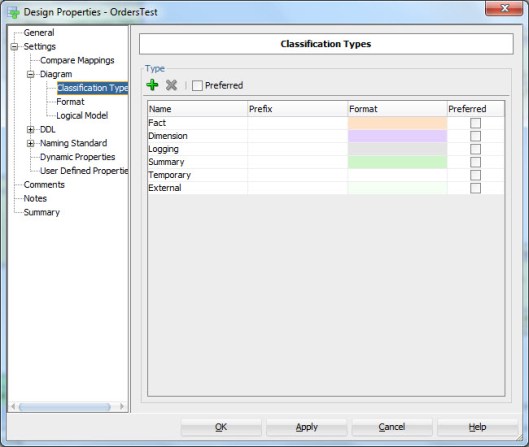
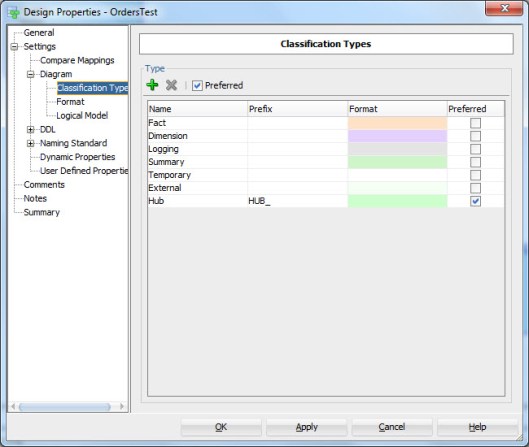
Most likely the reason is that you have the Preferred property enabled for logical datatypes and when you change to domains it stays enabled. You have not defined any domains and preferred domains and that is why the list is empty.

domain

domain2

Either disable Preferred or define the domains as preferred in Preferences.

domain3


Heli’s Tour

10 Friday Jun 2016

Posted by Helifromfinland in Events

≈ Leave a comment

I am on my way home after travelling for 10 days. I visited 3 countries and attended 5 events. At the moment I am in Germany waiting to be boarded to my last flight of this tour.

I started my tour with the OTN Cloud Developer Challenge in Leiden, Netherlands. Then I attended the AMIS25 celebrations with two talks: My fav SQL Developer features and Managing changes in database structures. After that I flew to Sofia, Bulgaria where I drove to Borovets for the BGOUG event. At the BGOUG I gave two talks: one about Big Data and the second one about my fav SQL Developer features. After BGOUG I had one day to rest in Sofia (=to do my real work) and then Milena and I drove to Bucharest, Romania. In Romania I attended the EOUC Presidents’ meeting and I gave two talks at the local user group (RoOUG). The first talk was about Big Data and the second one about database security.

I had a great 10 days and I would like to thank all the organizers, attendees and fellow speakers. I am very tired but it really was a great (and efficient J ) tour! Now I will rest a bit before OUG Scotland in Glasgow and KScope16 in Chicago…

← Older posts
Newer posts →

Subscribe

  • Entries (RSS)
  • Comments (RSS)

Archives

  • October 2023
  • October 2022
  • October 2021
  • April 2020
  • October 2019
  • October 2018
  • June 2018
  • December 2017
  • October 2017
  • September 2017
  • July 2017
  • April 2017
  • March 2017
  • February 2017
  • January 2017
  • December 2016
  • November 2016
  • October 2016
  • September 2016
  • August 2016
  • July 2016
  • June 2016
  • May 2016
  • April 2016
  • March 2016
  • February 2016
  • December 2015
  • November 2015
  • October 2015
  • September 2015
  • August 2015
  • July 2015
  • June 2015
  • May 2015
  • April 2015
  • March 2015
  • January 2015
  • December 2014
  • November 2014
  • October 2014
  • September 2014
  • August 2014
  • June 2014
  • May 2014
  • April 2014
  • January 2014
  • December 2013
  • November 2013

Categories

  • Data Modeler
  • Database design
  • Events
  • General
  • Oracle
  • SQL Developer

Meta

  • Create account
  • Log in

Create a free website or blog at WordPress.com.

Privacy & Cookies: This site uses cookies. By continuing to use this website, you agree to their use.
To find out more, including how to control cookies, see here: Cookie Policy
  • Subscribe Subscribed
    • HeliFromFinland
    • Join 53 other subscribers
    • Already have a WordPress.com account? Log in now.
    • HeliFromFinland
    • Subscribe Subscribed
    • Sign up
    • Log in
    • Report this content
    • View site in Reader
    • Manage subscriptions
    • Collapse this bar
 

Loading Comments...