• About Heli

HeliFromFinland

~ Heli's thoughts on Machine Learning, AI, AI Agents, Database Designing, Oracle SQL Developer Data Modeler, User Groups and much more

HeliFromFinland

Category Archives: Data Modeler

Oracle SQL Developer Data Modeler

Data Modeler Reports: Templates and Configurations

11 Sunday Dec 2016

Posted by Helifromfinland in Data Modeler

≈ 1 Comment

I do not understand why there are configurations and templates related to reports in Data Modeler. What is the difference and when are they used?


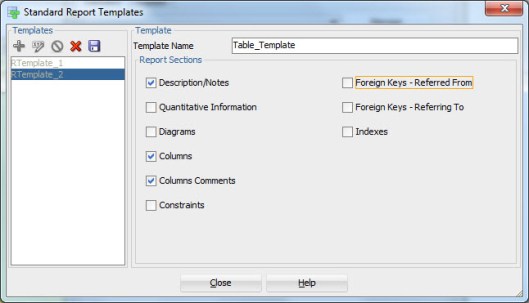
A Template describes what element types and their properties will be included in the report. For instance Tables, their descriptions, Columns and their Comments.

template


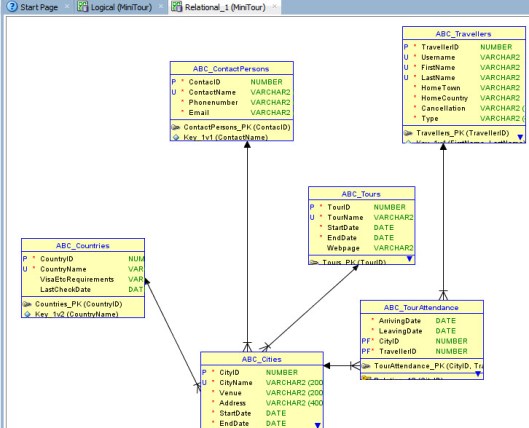
While as a configuration defines which objects of the selected element type will be included in the report. For instance tables: Customers, Orders, Products and Orderlines, or any table that is included in the subview Movie.

configuration


New reports in Data Modeler 4.2EA

10 Saturday Dec 2016

Posted by Helifromfinland in Data Modeler

≈ 1 Comment

I have posted about some of the new features we will see in version 4.2 and currently see in 4.2EA. Here’s one more:

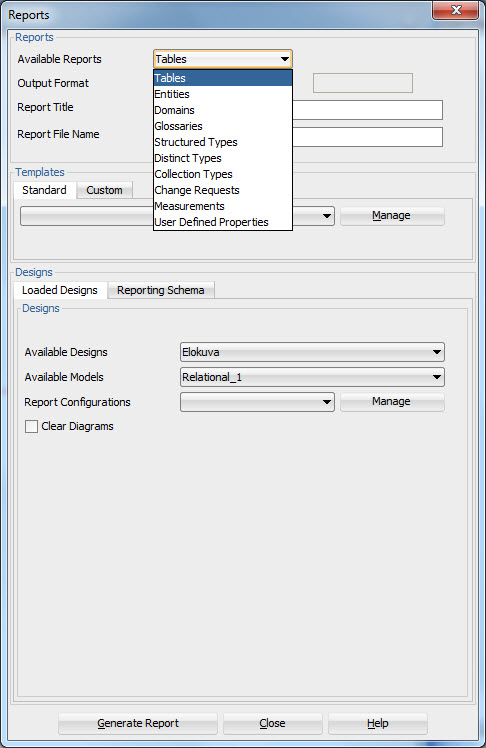
In 4.1.5 we have these reports available:

reports415

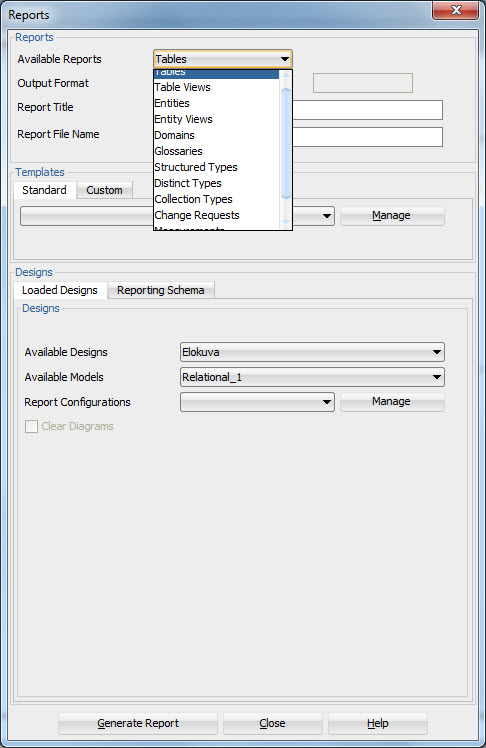
and in 4.2 we have those as well as some new ones: Table Views and Entity Views.

reports42ea


DDLs for Table synonyms

30 Wednesday Nov 2016

Posted by Helifromfinland in Data Modeler

≈ Leave a comment

In my company we always define synonyms for all the tables. I do not want to manually define them and actually I do not need to see them in my Browser. Is there a way to get the DDLs generated for those synonyms automatically, without defining anything?

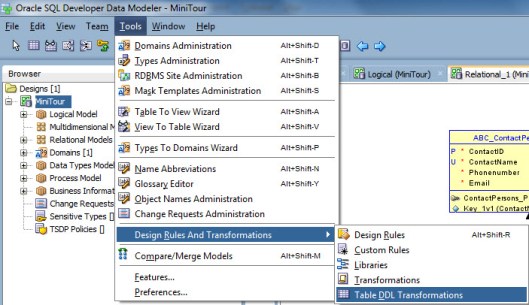
Yes, use Table DDL Transformations.
syn1

Define the name for the Table DDL Transformation Script (in this example PrivateSynonym), define when it will be triggered (in this example After Create, meaning it will be the last DDL for the table), type the script:
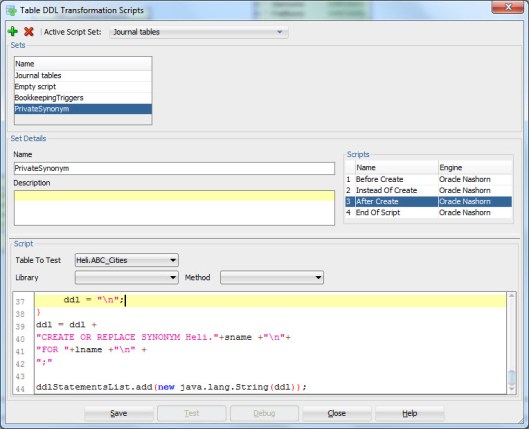
syn2

Press Save. Then you can test the script by selecting one table from the Table to Test list and pressing Test.

This is what I got:
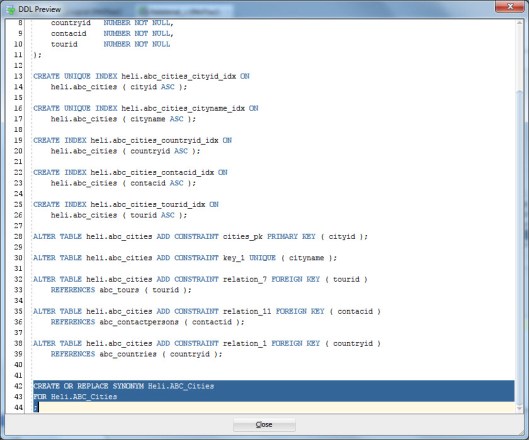
syn3

NOTE: the synonym is only created for the DDL not the design, you will not see any synonyms in the Browser.

To get the DDL generated select this script in DDL generation:
syn4

Select the tables you want to generate the synonyms and press OK.

P.S. If the DDL File Editor shows blank you might have hit a known bug.

Workaround: Go back to Table DDL Transformations and select the script. Select After Create, type a space, remove it and save the script again.

You can use this script written by Marko Helskyaho, or write your own. This one creates a private synonym for all the tables selected for DDL generation.

/*
variable ddlStatementsList should be used to return the list with DDL statements
that are created by script – as shown below:
ddlStatementsList.add(new java.lang.String(ddl));
other available variables:
– model – relational model instance
– pModel – physical model instance
– table – the table in relational model
– tableProxy – table definition in physical model
*/
var ddl;
var lname;
var sname;
prompt = model.getAppView().getSettings().isIncludePromptInDDL();
useSchema = model.getAppView().getSettings().isIncludeSchemaInDDL();
if(model.getStorageDesign().isOpen()){
if(useSchema){
lname = tableProxy.getLongName();
sname = tableProxy.getName();
}else{
lname = tableProxy.getName();
sname = tableProxy.getName();
}
}else{
if(useSchema){
lname = table.getLongName();
sname = tableProxy.getName();
}else{
lname = table.getName();
sname = tableProxy.getName();
}
}

if(prompt){
ddl= “\nPROMPT Creating Synonym for ‘”+lname+”‘;\n”;
}else{
ddl = “\n”;
}
ddl = ddl +
“CREATE OR REPLACE SYNONYM Heli.”+sname +”\n”+
“FOR “+lname +”\n” +
“;”

ddlStatementsList.add(new java.lang.String(ddl));

Comments in RDBMS

22 Tuesday Nov 2016

Posted by Helifromfinland in Data Modeler

≈ 1 Comment

I have entered the descriptions in Data Modeler (Comments in RDBMS), for tables and columns, to be implemented in the database  but when I generate the DDL the comments are not there. What am I doing wrong?

Remember the Preferences? That’s the answer again.

Go to Tools, Preferences.

Select Data Modeler, DDL and enable Generate Comments in RDBMS.

commentsddl

Now that you generate the DDLs they will include the Comments in RDBMS you have entered in Data Modeler:

commentsddl2


How to define a prefix for table names?

21 Monday Nov 2016

Posted by Helifromfinland in Data Modeler

≈ Leave a comment

I want to define a prefix for my table names. Can that be done easily? Yes 🙂

Right-click the name of the relational model in Browser and select Change Object Names Prefix:

prefix1

Select Prefix replacement, type the prefix wanted to the New Prefix field and select Add new prefix. Select Tables. Then press Apply.

prefix2

Now all the tables in selected relational model will have the new prefix in the table name:

prefix3

You can use this also to add prefixes to the names of Views, FK Constraints, Columns, Indexes, or PK&UK Constraints.

Comparing, Part 1: A database to a database

12 Wednesday Oct 2016

Posted by Helifromfinland in Data Modeler, Oracle

≈ 2 Comments

I am writing a serie of posts about different compares: comparing databases and comparing database designs. The possibility to automatically compare different versions of the database or a design is very crutial to have good quality designs and databases.

This first post is about comparing two databases. Maybe the production and the test?

If I want to compare two databases to each other, I use SQL Developer and the Database Diff functionality you can find under Tools menu.

comp1

First select the Source Connection and the Target Connection and select the parameters the way you want.

comp2

Press Next (In Finnish that is Seuraava 🙂 , see SQL Developer even speaks Finnish :-D) )

Select the database object to be compared and press Next:

comp3

You can specify objects:

comp4

Or select all by just pressing Next.

You can see what will be compared and what will not:

comp5

If you are happy with it just press OK, otherwice press Back and change your parameters.

In the Diff Report you can see in green all the new objects and in yellow all the objects that has been changes. If you select an object from the list you can see the exact change:

comp6

And if you select the Script tab you can see the DDL script to make that change to your target database:

comp7

Do you think this is a feature you should be using? 😀

What’s new in Data Modeler 4.2EA? Part 9: End of the serie

09 Sunday Oct 2016

Posted by Helifromfinland in Data Modeler

≈ 3 Comments

This is the last post of my What’s new in Data Modeler 4.2EA posts. What else is new is the integration to Subversion, there are some big changes. I will not go to details yet (will do it when the official 4.2 is out) but just a reminder: do not use several versions of Data Modeler to update your designs simultaneously, just select one version and use that. It is the same rule you probably follow with other software products too.

I hope this serie has been useful to you. I already have an idea about the next serie, stay tuned 🙂


Domain Names in a diagram

07 Friday Oct 2016

Posted by Helifromfinland in Data Modeler

≈ 1 Comment

I want to see the domain name in the logical diagram instead of the datatype. How can I do it?

Go to Design Properties (either double-click the design name or right-click and select Properties). Go to Settings, Diagram, Logical Model and select Domain Name for the Domain presentation:

domainname


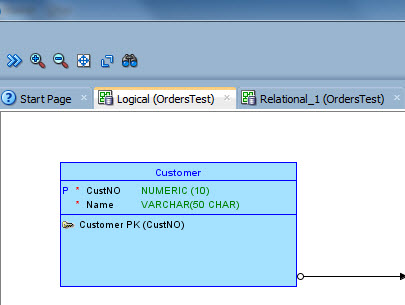
See the datatype for Name before the change (Used Logical Type selected):

dom1


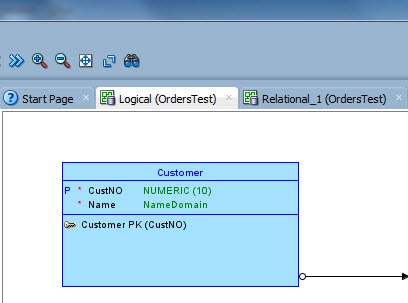
And after we changed the Domain presentation to Domain Name (the domain used for the attribute Name is called NameDomain in our example):

dom2


What’s new in Data Modeler 4.2EA? Part 8: Group objects by schema

05 Wednesday Oct 2016

Posted by Helifromfinland in Data Modeler

≈ 1 Comment

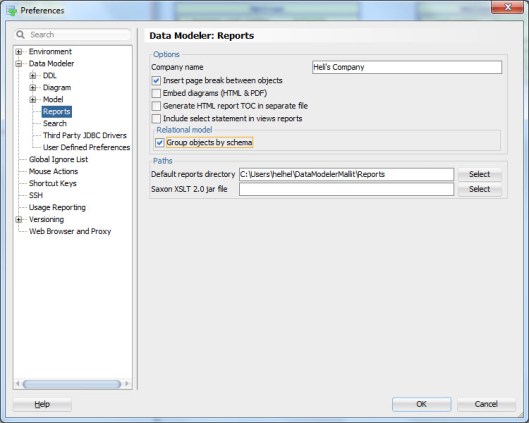
There is one more Preference left we have not discussed about: Group objects by schema.

ea2_21

Here are the TOCs of two PDF reports on the same design:

ea_toc_pdf_group

On the left hand side there is the report where the preference is set on and on the right it has been set off. If the preference has been set the TOC will show the elements in groups based on the schema owner if it has been set off the elements are shown in alphabetical order.


What’s new in Data Modeler 4.2EA? Part 7: Embed diagrams (HTML&PDF)

04 Tuesday Oct 2016

Posted by Helifromfinland in Data Modeler

≈ 1 Comment

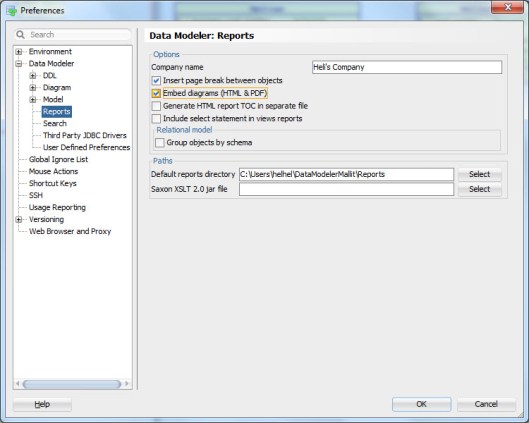
A really great new feature in this release is the possibility to add diagrams in a report AND navigate from the object in a diagram to the detail section in a report.


ea2_20

Just set the Preference Embed diagrams (HTML&PDF) on.

In this release there are still some limitations/issues on this functionality but in the next release Data Modeler will allow you to add diagrams in PDF reports to both entity and table reports and in HTML reports it allows you to add diagrams in table reports.

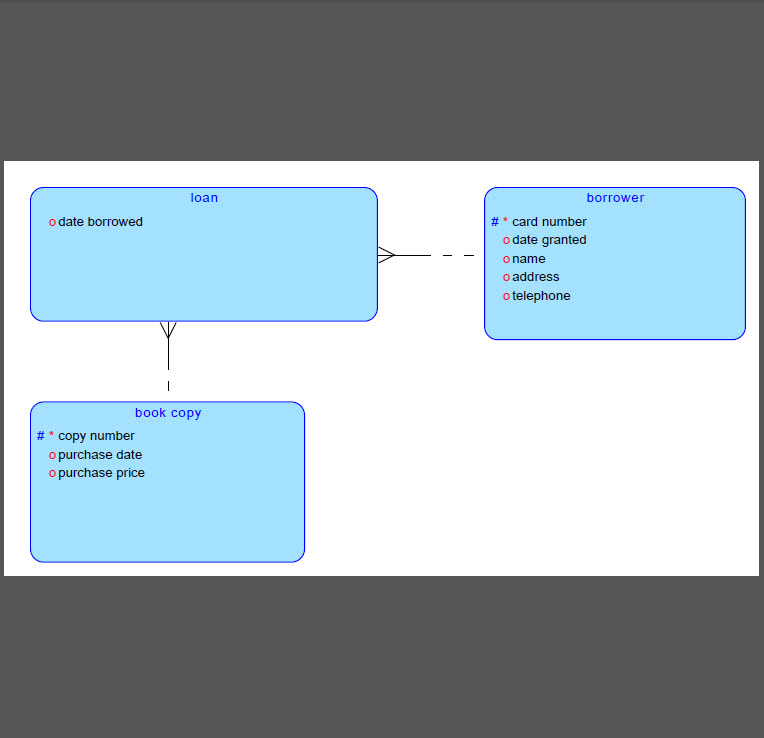
For instance if I have the Preference on and I execute a PDF report for entities, I will have the diagram in the end of the report:

ea_rep1

If I click the name of the entity Loan, it will navigate me to the details of that entity:

ea_rep2

There will also be the TOC for a PDF report and if I choose an element from that I will be automatically navigated to the element details on the report:

toc_pdf


If I have subviews defined I can also see them in the TOC. If I click the name of a subview I will be automatically navigated to that subview in the report:

toc_pdf2


← Older posts
Newer posts →

Subscribe

  • Entries (RSS)
  • Comments (RSS)

Archives

  • December 2025
  • October 2023
  • October 2022
  • October 2021
  • April 2020
  • October 2019
  • October 2018
  • June 2018
  • December 2017
  • October 2017
  • September 2017
  • July 2017
  • April 2017
  • March 2017
  • February 2017
  • January 2017
  • December 2016
  • November 2016
  • October 2016
  • September 2016
  • August 2016
  • July 2016
  • June 2016
  • May 2016
  • April 2016
  • March 2016
  • February 2016
  • December 2015
  • November 2015
  • October 2015
  • September 2015
  • August 2015
  • July 2015
  • June 2015
  • May 2015
  • April 2015
  • March 2015
  • January 2015
  • December 2014
  • November 2014
  • October 2014
  • September 2014
  • August 2014
  • June 2014
  • May 2014
  • April 2014
  • January 2014
  • December 2013
  • November 2013

Categories

  • Data Modeler
  • Database design
  • Events
  • General
  • Machine learning and AI
    • AI Agents
  • Oracle
  • SQL Developer

Meta

  • Create account
  • Log in

Create a free website or blog at WordPress.com.

Privacy & Cookies: This site uses cookies. By continuing to use this website, you agree to their use.
To find out more, including how to control cookies, see here: Cookie Policy
  • Subscribe Subscribed
    • HeliFromFinland
    • Join 53 other subscribers
    • Already have a WordPress.com account? Log in now.
    • HeliFromFinland
    • Subscribe Subscribed
    • Sign up
    • Log in
    • Report this content
    • View site in Reader
    • Manage subscriptions
    • Collapse this bar
 

Loading Comments...