• About Heli

HeliFromFinland

~ Heli's thoughts on Machine Learning, AI, AI Agents, Database Designing, Oracle SQL Developer Data Modeler, User Groups and much more

HeliFromFinland

Category Archives: Data Modeler

Oracle SQL Developer Data Modeler

What’s new in Data Modeler 4.2EA? Part 6: Include select statement in views reports

02 Sunday Oct 2016

Posted by Helifromfinland in Data Modeler

≈ 2 Comments

The new preference, Include select statement in views reports, for reporting in Data Modeler 4.2EA includes the SQL statement used for the query to the report.

ea2_14

To generate a report on views select Table Views report template:

ea2_10

If the preference has not been set the report would look something like this:

ea2_12

And if it has been set it might look something like this:

ea2_11

The report will show the SQL statement for the view in the new Select Statement field in a report template for Table Views.


What’s new in Data Modeler 4.2EA? Part 5: Generate HTML report TOC in separate file

01 Saturday Oct 2016

Posted by Helifromfinland in Data Modeler

≈ 1 Comment

In Data Modeler 4.2EA there are some new preferences for reporting. Let’s first see the new preference Generate HTML report TOC in separate file.

ea2_13

This preference ONLY affects reports generated in HTML format.

This does not affect the generated report itself: it looks the same does not matter if you chose this preference or not. But it does affect to the files generated for the report. In our example a report generated without this preference only has one file: in our example AllTablesDetails_NoSeparateTOC.html. Whereas the report with this preference on has three files: AllTablesDetails_SeparateTOC.html, AllTablesDetails_SeparateTOC_index.html and AllTablesDetails_SeparateTOC_toc.html.

ea2_9

Note that whenever we generate a report with Data Modeler (no matter how we chose the preferences) also a file report_data.xml is generated.

Why would I like to get the TOC in separate file? While the TOC is in separate file I can for example browse the report without the TOC or print the report.


What’s new in Data Modeler 4.2EA? Part 4: New preferences for Reporting

30 Friday Sep 2016

Posted by Helifromfinland in Data Modeler

≈ 1 Comment

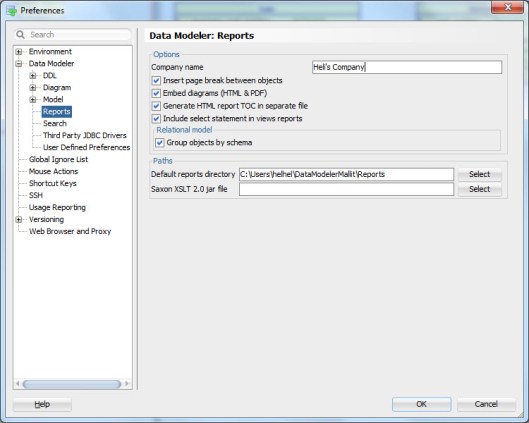
Starting in version 4.2.0 (build 917) known as 4.2EA there are new preferences for reporting that allow you to generate even better Standard template reports.

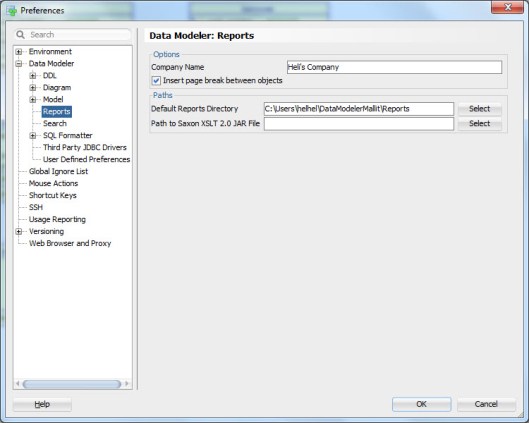
The Preferences before this release were:

ea2_8

And since 4.2EA:

ea2_7

There are five new preferences that will make your reports look and work even better than before. I will explain these Preferences in detail on my next blog posts  🙂 Stay tuned  😀

What’s new in Data Modeler 4.2EA? Part 3: A View and a Query

29 Thursday Sep 2016

Posted by Helifromfinland in Data Modeler

≈ 3 Comments

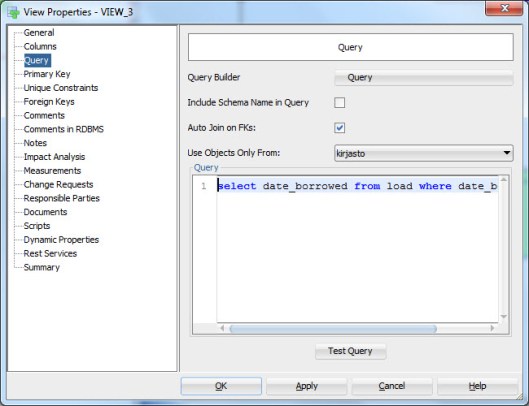
Starting in version 4.2.0 (build 917) known as 4.2EA you can define the query for a view without using the Query Builder. You can simply type or copy/paste the SQL query wanted to the new Query box in a new Query tab located in the View Properties:

ea2_6

You can test the query by pressing the Test Query button. If I had pressed that button I had noticed that I made a typo on table name (load vs. loan)  😀 This button is very useful…

Of course the Query Builder is also available if you rather use that. But when and why would I like to use this new functionality? I know that using this functionality there will be no lost of formatting, no problems with hints, no problems with the comments inside the query etc. In short no editing that is not done by me  🙂


What’s new in Data Modeler 4.2EA? Part 2: Change Requests

28 Wednesday Sep 2016

Posted by Helifromfinland in Data Modeler

≈ 2 Comments

Enhancements in Change Requests

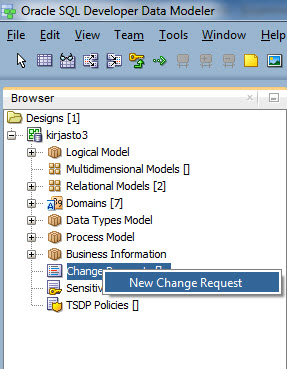
Starting in version 4.2.0 (build 917) known as 4.2EA you can create Change Requests in the Browser. Right-click the Change Request in the Browser and select New Change Request.

ea2_3


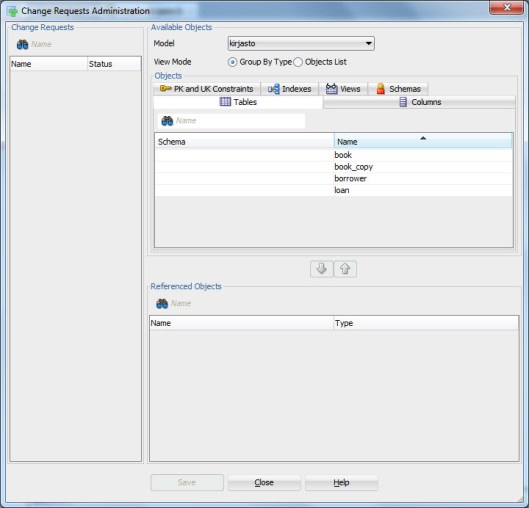
There is also a new tool for managing the Change Requests called Change Requests Administration. You can find it under the Tools menu:

ea2_4

And this is how the tool looks like:

ea2_5

Are you interested in learning more about Change Requests?

https://helifromfinland.wordpress.com/2014/10/18/handling-change-requests-with-data-modeler/


What’s new in Data Modeler 4.2EA? Part 1: Design Rules

27 Tuesday Sep 2016

Posted by Helifromfinland in Data Modeler

≈ 1 Comment

4.2EA is mostly bug fixes but there are also some new features that I think you should know about. I will blog about some of them in a serie of What’s new in Data Modeler 4.2EA posts. This is the first one of that serie.

Design rules for a subview or a selected set of objects

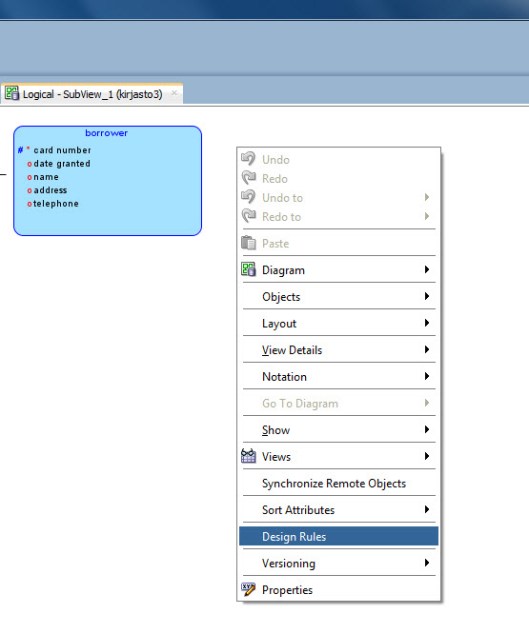
Starting in version 4.2.0 (build 917) known as 4.2EA you can apply design rules to objects in a subview (they will not be applied to objects that do not exist in this subview). Simply right-click on the canvas of a subview and select Design Rules.

ea2_1

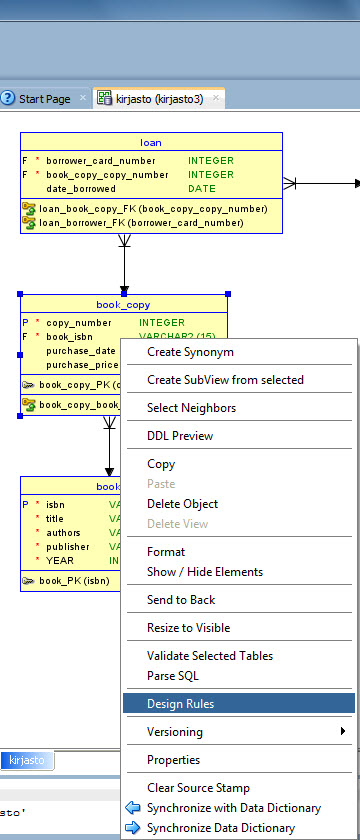
You can also select one or more objects from the canvas, right-click and select Design Rules. The rules will only apply to the selected objects.

ea2_2


What is a Design Rule?

https://helifromfinland.wordpress.com/2016/07/21/design-rules/


Data Modeler 4.1.5 is OUT!

18 Sunday Sep 2016

Posted by Helifromfinland in Data Modeler

≈ Leave a comment

I love the Oracle OpenWorld time: interesting things happen!

Data Modeler 4.1.5 is out but so is the EA for 4.2!

Go and download:

http://www.oracle.com/technetwork/developer-tools/datamodeler/downloads/datamodeler-087275.html


What’s new in 4.1.5? Plenty of bugs fixed:

“Date: September 2016

This list contains only a selection of higher priority bugs, customer bugs and issues raised by the community on the OTN Forum since the release of version 4.1.3.

24642626 – MODIFIED OBJECTS DO NOT APPEAR IN INCOMING CHANGES
23214498 – NEED TO DELETE TWICE WHEN DELETE STRUCTURED TYPE
24618730 – CANNOT GENERATE DDL WHEN TABLE HAS $ IN THE NAME – FOR AUTOINCREMENT COLUMN
24570374 – LIKE CONDITION IS IMPORTED AS LOV CONSTRAINT
22596042 – FOREIGN KEYS NOT RECOGNIZED IN SYNC USING THIRD PARTY JDBC DRIVER
23504656 – UDP LIBRARIES PUT INTO DESIGN’S FILES DIRECTORY ARE NOT LOADED
23258992 – [IMPLICIT] AS OWNER SHOULD NOT BE INCLUDED IN DDL FOR DB2/390
24009706 – ADVANCED SEARCH – CANNOT USE TWO OR MORE FILTERS WITH THE SAME PROPERTY
23561479 – DYNAMIC/USER DEFINED PROPERTIES DO NOT APPEAR IN SECOND LEVEL OBJECTS IN REPORT
23737449 – CHANGING PRIMARY KEY NAME IS NOT SAVED
22681021 – SAVED MODEL INCOMPLETE AFTER SAVE UPON EXIT
22761767 – LABELS IN RELATIONAL MODEL ARE NOT SIZED PROPERLY AND TEXT IS WRAPPED AND HIDDEN
22394744 – EDIT ONE DOMAIN PROPERTY – CAN NOT ADD COMMENT
22462199 – MANY TO MANY RELATIONSHIP NOT ENGINEERED PROPERLY – RELATIONSHIP ATTRIBUTES

”

Let’s talk more about EA 4.2 a bit later…


Cheers,

Heli

My Books

29 Friday Jul 2016

Posted by Helifromfinland in Data Modeler, Database design, Oracle

≈ Leave a comment

So far I have written two books, the first one by myself and the second one with good friends. If you are interested check from Amazon:

Where does Data Modeler save the log files?

25 Monday Jul 2016

Posted by Helifromfinland in Data Modeler

≈ Leave a comment

Stop guessing and define it yourself!

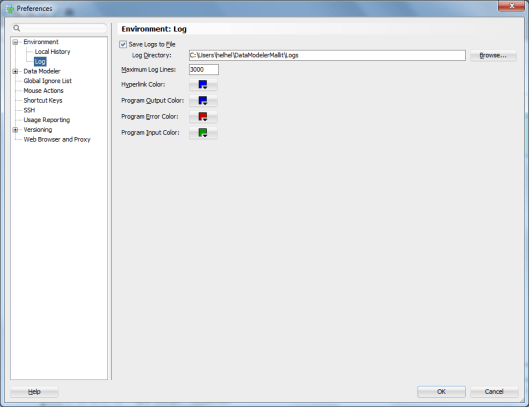
Go to Preferences:

Logs1


Select Environment, Log. Then select Save Logs to File and define the Log Directory.

Logs2


Delete Object/Delete View

24 Sunday Jul 2016

Posted by Helifromfinland in Data Modeler

≈ Leave a comment

What is the difference between Delet Object and Delete View?

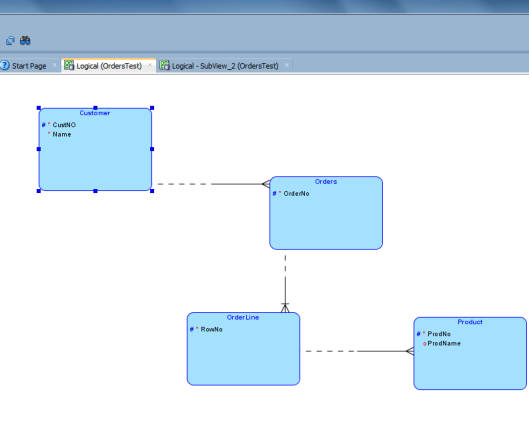
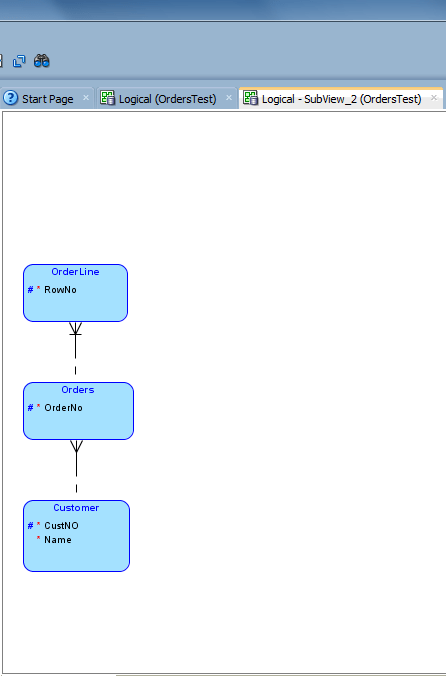
If you right-click and object in a diagram there might be two options: Delete Object and Delete View. “Might” because the Delete View is only available if you have that object in more than one diagram.

DeleteObject

Delete Object removes that object totally from the design: from this diagram and from all diagrams where it exists. The object is totally deleted from the design. If the object exists in more than one diagram, you will also see the Delete View option. That will delete the object BUT only from this diagram, not from the whole design.

Let’s see an example with an entity called Product.

This is the Logical Model:

DeleteObject2

This is a subview:

DeleteObject3

Now in the subview I select Delete View for the entity Product.

The Logical Model still has the entity Product:

DeleteObject2

But the subview does not:

DeleteObject4


← Older posts
Newer posts →

Subscribe

  • Entries (RSS)
  • Comments (RSS)

Archives

  • December 2025
  • October 2023
  • October 2022
  • October 2021
  • April 2020
  • October 2019
  • October 2018
  • June 2018
  • December 2017
  • October 2017
  • September 2017
  • July 2017
  • April 2017
  • March 2017
  • February 2017
  • January 2017
  • December 2016
  • November 2016
  • October 2016
  • September 2016
  • August 2016
  • July 2016
  • June 2016
  • May 2016
  • April 2016
  • March 2016
  • February 2016
  • December 2015
  • November 2015
  • October 2015
  • September 2015
  • August 2015
  • July 2015
  • June 2015
  • May 2015
  • April 2015
  • March 2015
  • January 2015
  • December 2014
  • November 2014
  • October 2014
  • September 2014
  • August 2014
  • June 2014
  • May 2014
  • April 2014
  • January 2014
  • December 2013
  • November 2013

Categories

  • Data Modeler
  • Database design
  • Events
  • General
  • Machine learning and AI
    • AI Agents
  • Oracle
  • SQL Developer

Meta

  • Create account
  • Log in

Create a free website or blog at WordPress.com.

Privacy & Cookies: This site uses cookies. By continuing to use this website, you agree to their use.
To find out more, including how to control cookies, see here: Cookie Policy
  • Subscribe Subscribed
    • HeliFromFinland
    • Join 53 other subscribers
    • Already have a WordPress.com account? Log in now.
    • HeliFromFinland
    • Subscribe Subscribed
    • Sign up
    • Log in
    • Report this content
    • View site in Reader
    • Manage subscriptions
    • Collapse this bar
 

Loading Comments...