• About Heli

HeliFromFinland

~ Heli's thoughts on Machine Learning, AI, AI Agents, Database Designing, Oracle SQL Developer Data Modeler, User Groups and much more

HeliFromFinland

Category Archives: Data Modeler

Oracle SQL Developer Data Modeler

Sensitive Data

06 Wednesday Jul 2016

Posted by Helifromfinland in Data Modeler

≈ Leave a comment

You can also design your sensitive data using Data Modeler.

In table properties you can define a redaction policy for the table:
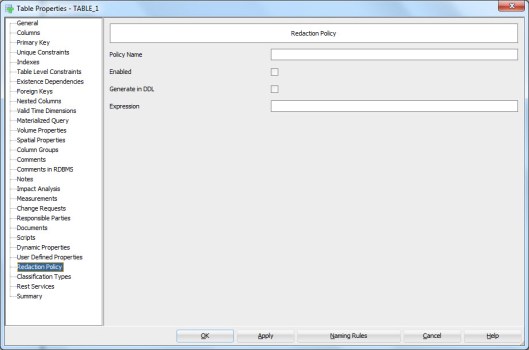
REdactionPOlicy

In column properties (double-click the column name in table properties or press the XYZ icon) select Security.

Security

In this tab you can design two main categories: Redaction and TSDP (Transparent Sensitive Data Protection).

In Redaction section you can define whether or not the column holds personally identifiable information (PII) (YES/NO), whether or not it holds sensitive information (YES/NO), the masking type used (FULL, NO, PARTIAL, RANDOM, REGEXP) and which masking template to use.

You can define your own masking templates by selecting Mask Templates Administration from Tools Menu:

MaskTemplates


After defining them they will be available in the list. Note that they must be of the same datatype as the column itself and of the same masking type selected to be seen on the list.


In TSDP section you can define the Sensitive Type used and type in the Sensitive Data Description.

You can define new sensitive types by right-clicking the Sensitive Types in Browser and selecting New Sensitive Type.

SensitiveTypes


And now back to the Column Properties and the Security Properties. In TSDP Section we can select a Sensitive Type created as a sensitive type for that column, as well as Masking Type and Mask Template:

SSNDef


You can also define sensitive type for a Domain:

SenTypeName


You can define new TSDP policies by right-clicking the TSDP Policies in the Browser and selecting New TSDP Policy:

TSDPPolicy

They can include Sub Policies:

SubPolicy

with Mask Types and Mask Templates etc.

You can also attach a Sensitive Type to the TSDP Policy:

TSDPSenType


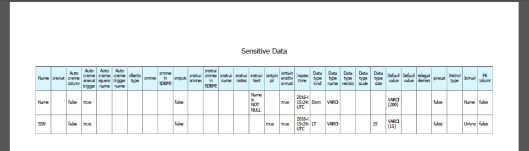
After designing the sensitive data you might want to see a report of it.

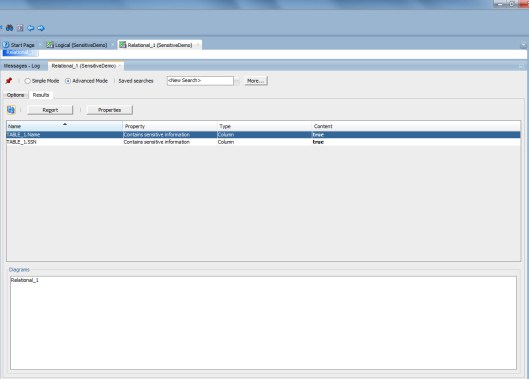
The best way to do that is Search and Advanced Mode:

SSNReport

Select Contains sensitive information Property and true.
ReportResult

Now you can see all the columns that have been defined to hold sensitive data.

Press Report and select the format type preferred etc.

And here we are…
Report


How to change the target and the source in comparing with a DDL?

22 Wednesday Jun 2016

Posted by Helifromfinland in Data Modeler

≈ Leave a comment

I want to compare a DDL and a design using File|Import|DDL File. I know my design is correct but the comparison always shows the DDL to be correct and suggests me to change the design. How to I tell the tool that my design is correct and I want to alter the database accordingly?

It is very simple. While importing the DDL select “Swap target model”

swapthetarget

Now the comparison will show the design as the source (truth) and the DDL as the target (false). AND it will give you the ALTER DDLs to change the database. Simply press DDL Preview to get those ALTER scripts.


How to get the Logical Model diagram visible again?

21 Tuesday Jun 2016

Posted by Helifromfinland in Data Modeler

≈ Leave a comment

I was working on my logical model diagram but now I cannot see that canvas anymore. How can I get it visible again?

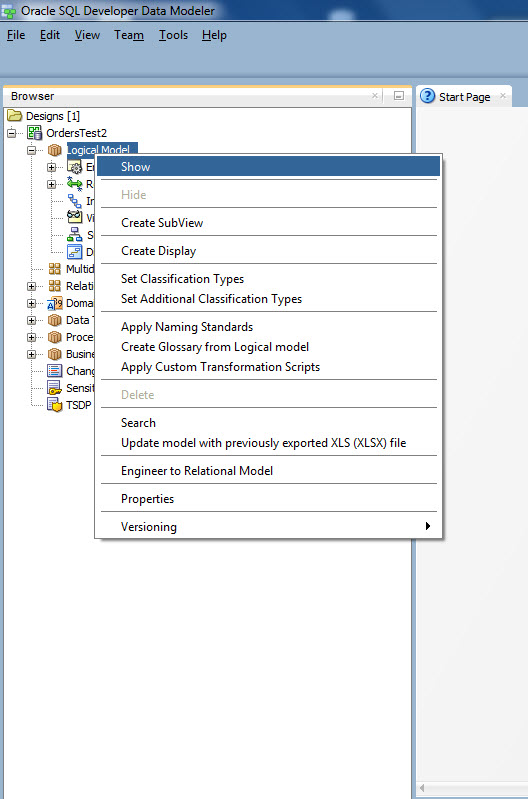
Right-click on the Logical Model in the Browser and select Show.


Show


How to sort attributes?

19 Sunday Jun 2016

Posted by Helifromfinland in Data Modeler

≈ 1 Comment

I would like to have my attributes in alphabetical order. Do I need to do it manually or is there a way to do it automatically?

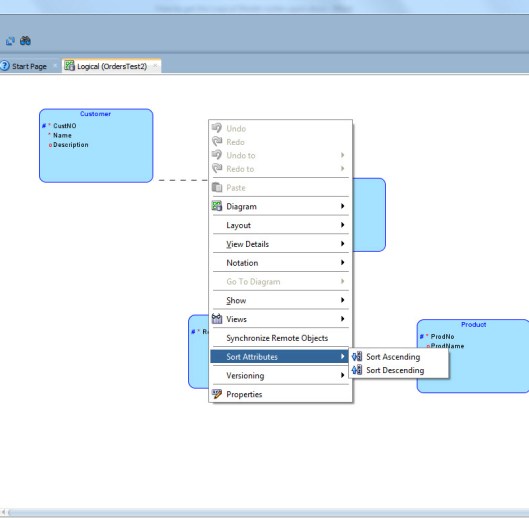
There is a way to do it automatically. Right-click on the Logical Model canvas and select Sort Attributes. You can sort them either ascending or descending.


Sort


But are you sure you want them to be in alphabetic order? Usually it is easier to understand the model if the primary key attributes are first and usually we define the mandatory attributes in the beginning of the list.


Why can’t I see the domains in the list?

10 Friday Jun 2016

Posted by Helifromfinland in Data Modeler

≈ Leave a comment

I have defined several domains but when I try to use them I cannot see any of them in the list. What is wrong?

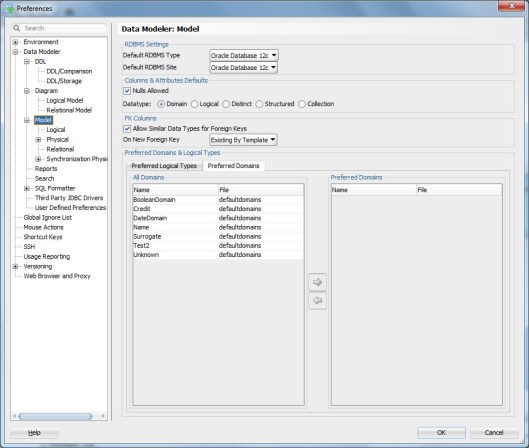
Most likely the reason is that you have the Preferred property enabled for logical datatypes and when you change to domains it stays enabled. You have not defined any domains and preferred domains and that is why the list is empty.

domain

domain2

Either disable Preferred or define the domains as preferred in Preferences.

domain3


How to define a default domain for automatically generated surrogate primary keys?

08 Wednesday Jun 2016

Posted by Helifromfinland in Data Modeler

≈ Leave a comment

I always use surrogates as primary key and I use the Data Modeler functionalities to generate them automatically. That is very good but I do not like that it only defines them as NUMERIC. I have defined a domain I would like to use when generating those primary keys but how can I tell Data Modeler to use that domain?


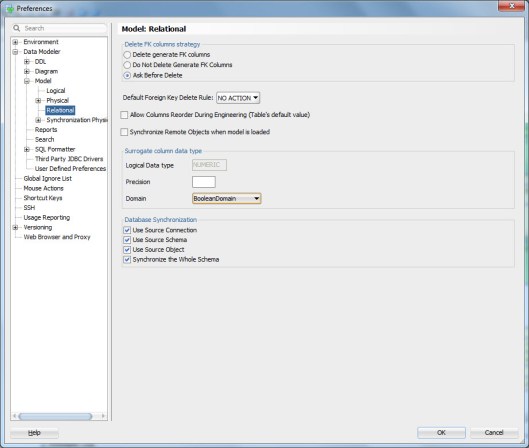
To define the default domain for surrogates go to Preferences, Data Modeler, Model, Relational and select that domain from the list of domains:

defaultdomainforsurrogates


Now when the tool generates a surrogate primary key it will use the domain definition for it.


What is a “Preferred Datatype”?

07 Tuesday Jun 2016

Posted by Helifromfinland in Data Modeler

≈ Leave a comment

My colleague is using something she calls Preferred Datatypes when working but I am not sure what she is talking about?

You can define some of the logical datatypes to be your preferred logical datatypes (or preferred domains). In the Preferences you define a list of logical datatypes as preferred logical datatypes like this:

Datatypes1


Then when designing the attributes you enable Preferred and will only see those logical datatypes, that were defined as preferred, in the list.

Datatype2


Now you do not need to go through the whole list of potential logical datatypes, only the ones that you find useful.


How to update the Physical Model?

03 Friday Jun 2016

Posted by Helifromfinland in Data Modeler

≈ Leave a comment

You have probably already learned that when you change the Logical Model you need to press the double-arrow pointing to right (Engineer to Relational Model) to get those changes to the Relational Model. But with Physical Model it is a different case: you create a Physical Model once and after that the tool will automatically add new object there. You only need to go and define the physical properties for those elements.

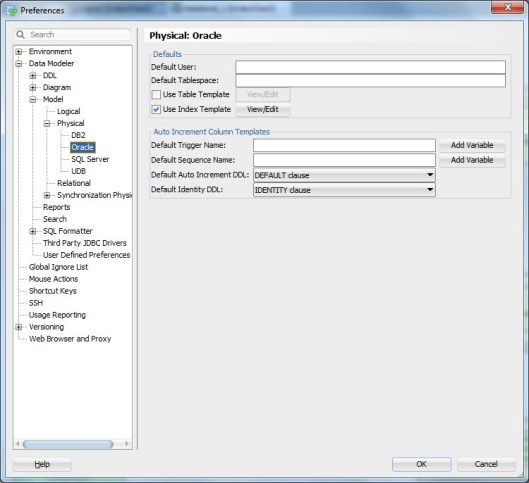
If you want, you can define defaults for physical properties. These defaults depend on the RDBMS selected: for example for Oracle they are different than for SQL Server. For Oracle RDBMS you can for example define the default user and the default tablespace.

3bitmap1


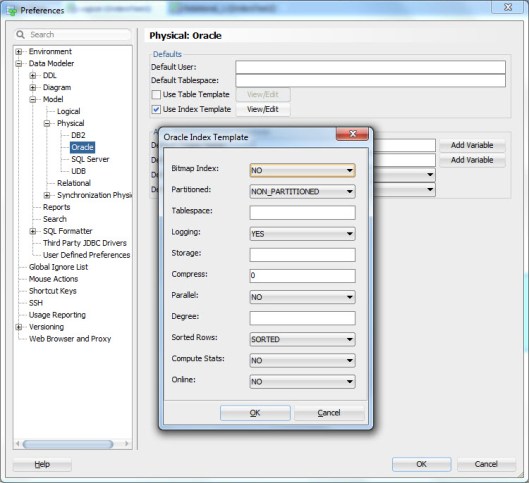
For some of the elements you can also define templates: a set of properties that will be automatically set for a new element of that type. For Oracle RDBMS you can for instance define a template for tables and indexes. Here’s an example of an index template for an Oracle RDBMS:

index3


The defaults you define in Preferences will be used to automatically set properties for a new elements of that type. But of course you can manually change them to something different for an individual element.

This functionality is very useful if the element of one type (tables, indexes, …) have some properties always or most of the time the same.

Note: You can also use Propagate Properties to easily copy properties from one element to several elements of the same type.

Note: if you cannot see the Physical Model in the Browser, right-click and select Open.


How to create a bitmap index?

03 Friday Jun 2016

Posted by Helifromfinland in Data Modeler

≈ Leave a comment

Because a bitmap index is an Oracle specific feature that can only be done in the Physical Model for Oracle RDBMS.

You define the indexes in Relational Model. First go to Table Properties of the table you want to create an index for and press the green plus. Add the information needed.

Index1

Then in Physical Model (for Oracle RDBMS) select that index and define it as bitmap index.

index2

When generating the DDL, you will get something like this:

CREATE BITMAP INDEX Orders_Customer_CustNO_IDX ON Orders
(
Customer_CustNO ASC
)
LOGGING ;


Note: If you want ALL your indexes in Oracle RDBMS to be bitmap indexes, you can define a template for indexes and set bitmap as a default. First enable the defaults for Oracle Physical Models Index Templates in Preferences:

3bitmap1

Then set (Press View/Edit) the default for Bitmap Index as YES.

3bitmap2


How to generate an index automatically for a Primary/Foreign or Unique Constraint?

03 Friday Jun 2016

Posted by Helifromfinland in Data Modeler

≈ Leave a comment

I have defined Primary Key, Unique Key and Foreign Key Constraints and I know I want to have indexes for them. Do I really need to go and define them one by one in Data Modeler? Not necessarily.

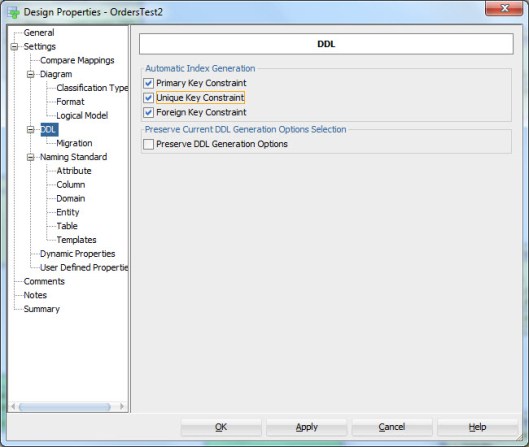
Go to Design Properties (double-click the name of the design or right-click and select Properties). Enable all or those you want from Automatic Index Generation.

2bitmap1

Now when you generate the DDLs, the DDLs for generating these indexes will be generated automatically.

How are those automatically generated indexes called? You can define that also in Design Properties as the template for Automatic Index.

2bitmap2


← Older posts
Newer posts →

Subscribe

  • Entries (RSS)
  • Comments (RSS)

Archives

  • December 2025
  • October 2023
  • October 2022
  • October 2021
  • April 2020
  • October 2019
  • October 2018
  • June 2018
  • December 2017
  • October 2017
  • September 2017
  • July 2017
  • April 2017
  • March 2017
  • February 2017
  • January 2017
  • December 2016
  • November 2016
  • October 2016
  • September 2016
  • August 2016
  • July 2016
  • June 2016
  • May 2016
  • April 2016
  • March 2016
  • February 2016
  • December 2015
  • November 2015
  • October 2015
  • September 2015
  • August 2015
  • July 2015
  • June 2015
  • May 2015
  • April 2015
  • March 2015
  • January 2015
  • December 2014
  • November 2014
  • October 2014
  • September 2014
  • August 2014
  • June 2014
  • May 2014
  • April 2014
  • January 2014
  • December 2013
  • November 2013

Categories

  • Data Modeler
  • Database design
  • Events
  • General
  • Machine learning and AI
    • AI Agents
  • Oracle
  • SQL Developer

Meta

  • Create account
  • Log in

Create a free website or blog at WordPress.com.

Privacy & Cookies: This site uses cookies. By continuing to use this website, you agree to their use.
To find out more, including how to control cookies, see here: Cookie Policy
  • Subscribe Subscribed
    • HeliFromFinland
    • Join 53 other subscribers
    • Already have a WordPress.com account? Log in now.
    • HeliFromFinland
    • Subscribe Subscribed
    • Sign up
    • Log in
    • Report this content
    • View site in Reader
    • Manage subscriptions
    • Collapse this bar
 

Loading Comments...