• About Heli

HeliFromFinland

~ Heli's thoughts on Machine Learning, AI, AI Agents, Database Designing, Oracle SQL Developer Data Modeler, User Groups and much more

HeliFromFinland

Category Archives: Data Modeler

Oracle SQL Developer Data Modeler

How to create a Physical Model?

01 Wednesday Jun 2016

Posted by Helifromfinland in Data Modeler

≈ Leave a comment

I have designed the Logical Model, pressed the double-arrow (Engineer to Relational Model) to get the Relational Model. Now I am ready to create a Physical Model for that Relational Model but how to do it?

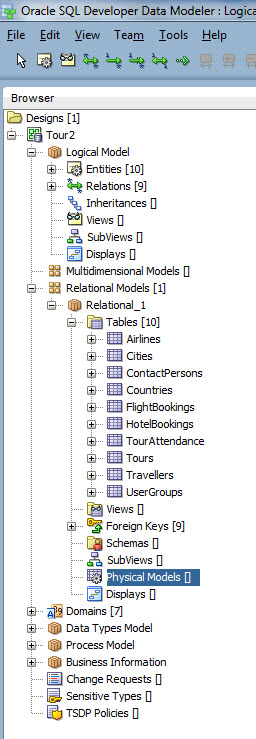
In Browser, under your Relational Model, select Physical Models.

Phys1

Right-click and select New.

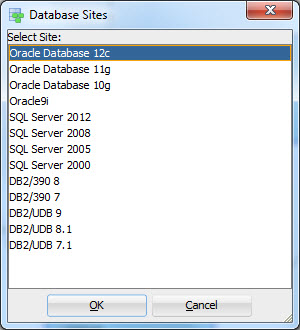
Then select the RDBMS and the version you want for a Physical Model (in Data Modeler terminology it is the Database Site).

Phys2

That’s it. You now have the Physical Model for the Relational Model. Note that you can have several Relational Models for one Logical Model and several Physical Models for one Relational Model, if needed.


NOTE: The Physical Model is not opened automatically when you open a design (for performance reasons). Go to the same Physical Models, right-click and select Open.


Stored Procedures, Functions, Packages and Data Modeler

31 Tuesday May 2016

Posted by Helifromfinland in Data Modeler

≈ Leave a comment

Quite often I hear a question: can I design my stored PL/SQL with Data Modeler too? I want to design the privileges etc. and I feel I should do it in Data Modeler.

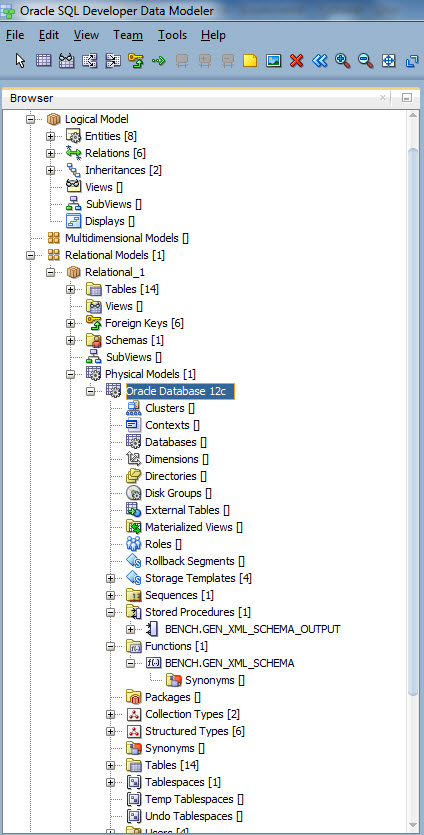
You are right: you should. Any code that is stored in the database is a database object just like a table or a view and should be designed and managed. But because a stored PL/SQL is an Oracle specific feature you can only find them in Physical Model in the Browser.

Browser

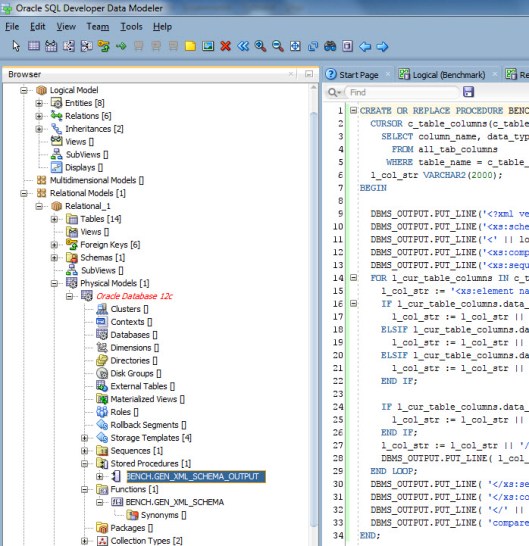
You can edit a Stored Procedure by right-clicking and selecting Edit.

edit


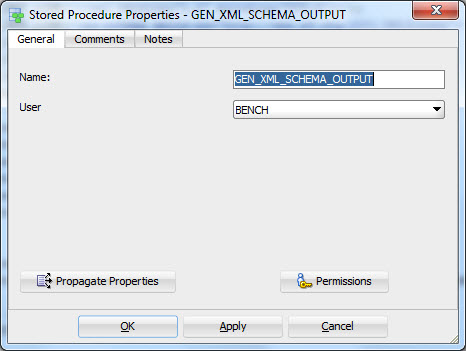
And you can define the Properties and Privileges by double-clicking the name or right-clicking and selecting Properties.

Properties


Sometimes it is somebody else in the project that manages the content (logic) of the code or you rather use SQL Developer for it. Then the best way is simply reverse engineer the code from either the DDL file or the Data Dictionary. You can do that by selecting File|Import|DDL File or File|Import|Data Dictionary.

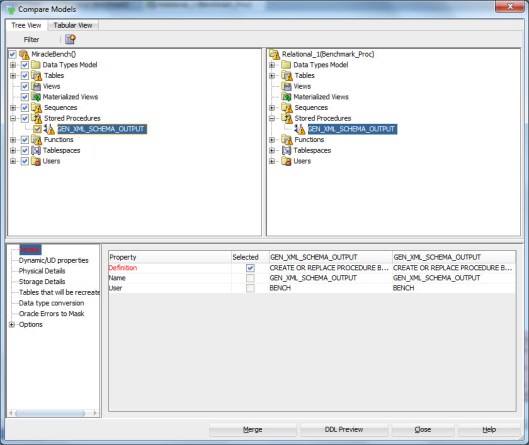
You can also compare the version of code you have in Data Modeler to the one in DDL or Data Dictionary. Simply select File|Import|DDL File or File|Import|Data Dictionary as you did while reverse engineering but since you already have the objects in you Physical Model instead of creating them the tool now shows how they are different from each other:

comp1

If you want to see the code that would be imported to the design, press DDL Preview. If you want to import the changes made to the version in DDL or Data Dictionary, press Merge.

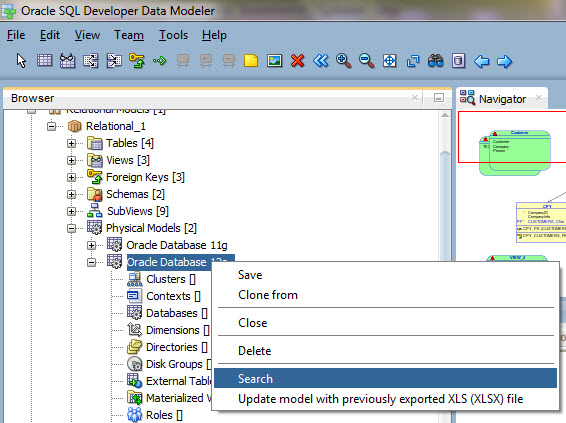
If I have my stored PL/SQL in Data Modeler, I am able to design and define the privileges for them. What else? For instance if I am changing the table Orders I can first check if I have any code that needs to be changed because of that. I do that using the Search functionality. Right-click on the name of your Physical Model and select Search.

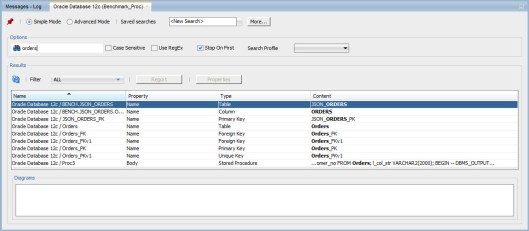
Type the table name you are planning to change and press Enter:

Search1

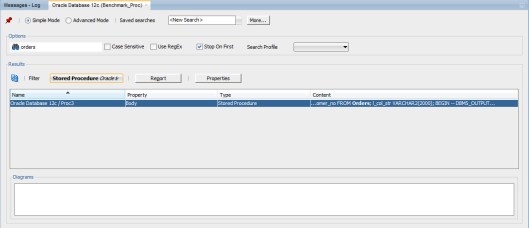
Select Stored Procedure from the Filter:

search2

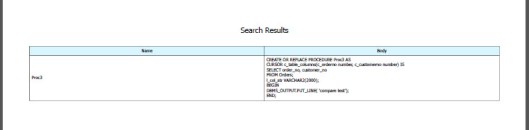
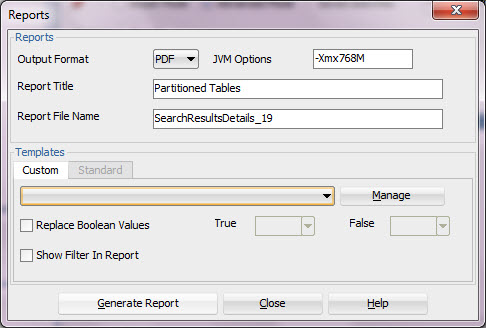
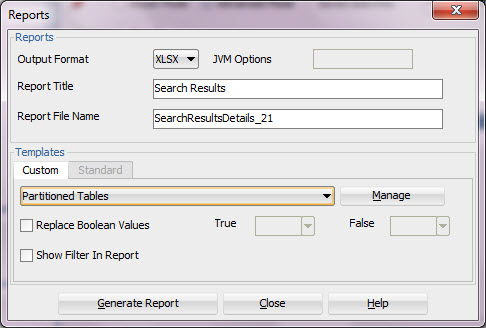
And using the Report button and a custom report template you can generate a report showing the code that might need change after your change in table structure:

result


Naming the Not NULL contraints with a Naming Standard Template

25 Wednesday May 2016

Posted by Helifromfinland in Data Modeler

≈ Leave a comment

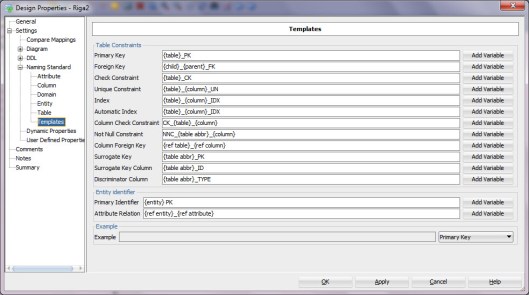
I have defined the naming standard for a NOT NULL Constraint in Design Properties (double-click the design name, Settings-> Naming Standards -> Templates) like this:

namingTemplates

How do I get my NOT NULL Constraints named as defined in the Template?

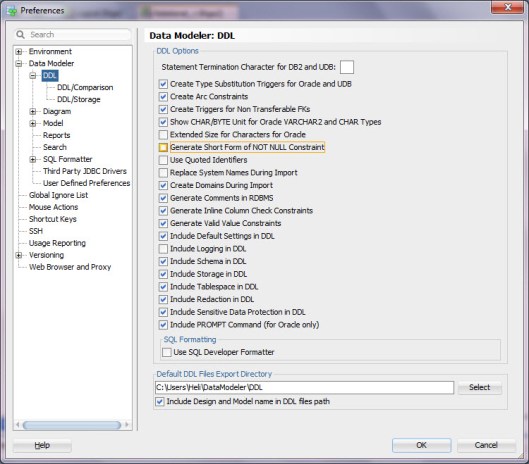
Check your Preferences.apply4Generate Short Form of NOT NULL Constraints must be turned off.


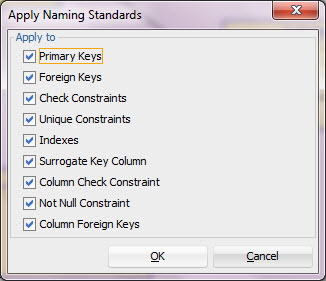
Then select the relational model from the Browser, right-click and select Apply Naming Standards to Keys and Constraints.applynamingstandars

Make sure to choose Not Null Constraints.

apply2

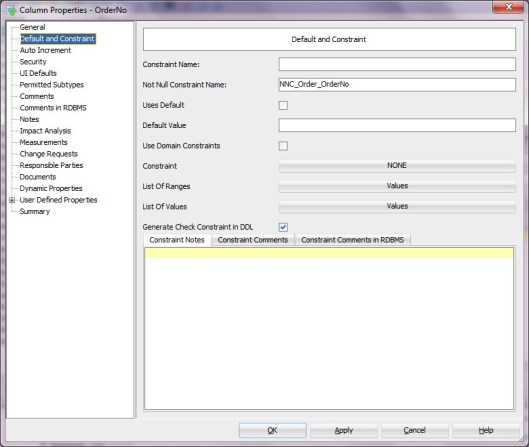
Now you can see the  names defined for the not null contraints in the Column Properties.

apply3

You can also see them defined in the DDL Preview.

apply5

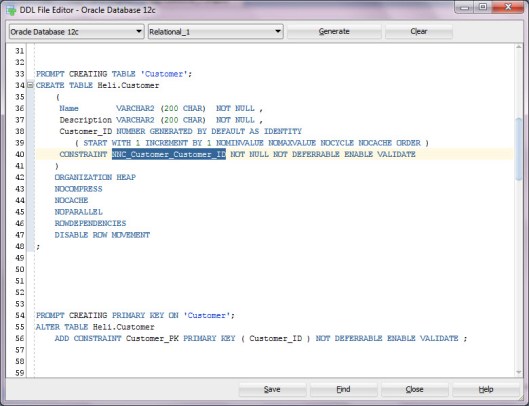
And in the DDL itself.

apply6


— Heli


Defining constraints for a Domain

10 Tuesday May 2016

Posted by Helifromfinland in Data Modeler

≈ 16 Comments

Using Domains is very wise: you only need to define the datatype and constraints once for a type of information. For instance username, money, or Boolean values. But how can I define a Domain with Oracle SQL Developer Data Modeler and how to use a domain?

Defining a Domain

Select Domain Administration from the Tools menu.

Press Add, define a Name, Logical type etc. for the Domain.
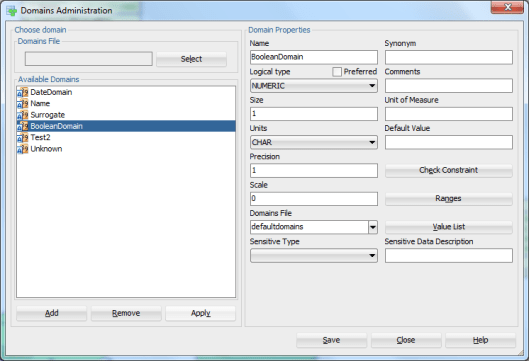
pic1

Press Apply and Save.


What if I want to define a constraint for columns of type BooleanDomain that can only have values 0 or 1?

Select the Domain you want to modify and press Modify. Press Value List.
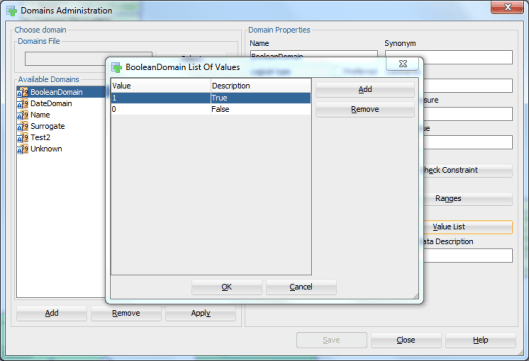
pic2

Press Add and add the Values wanted and their Descriptions.

Press OK. Press Apply (to confirm the modification to the Domain).


To specify an attribute or a column with that Domain select Domain as Data Type and your domain from the list. Apply.
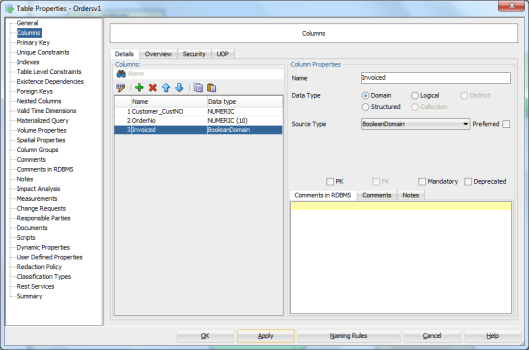
pic3


Now when you generate the DDLs for the table the column will be of the type defined in the Domain

CREATE TABLE Orders_Test

(

Customer_CustNO NUMBER (10) NOT NULL ,

OrderNo         NUMBER (10) NOT NULL ,

Invoiced        NUMBER (1)

) ;

And there will also be the DDL for defining the constraint:

ALTER TABLE Orders_Test ADD CHECK ( Invoiced IN (0, 1)) ;


What if I want to define a constraint ‘between 0-100 000’ for a Domain?

Define the domain Credit as explained earlier but instead of defining a Value List now press Ranges button.
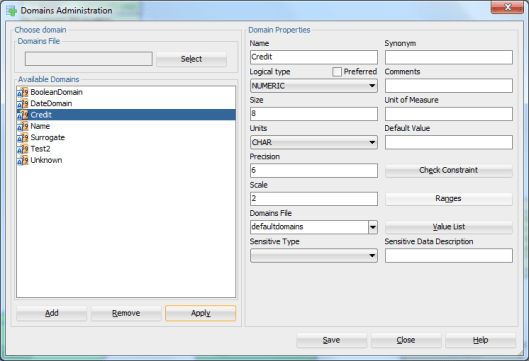
pic4

Define the Begin Value (0), the End Value (100000) and the Description (Credit Range). Press Add.
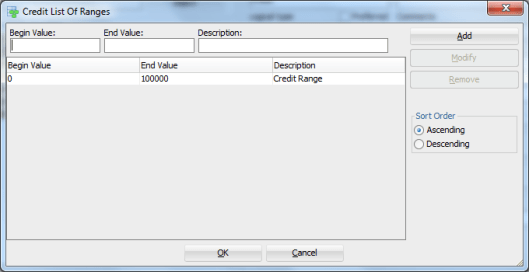
pic13


Then define an attribute or a column using this Domain as a Data Type.
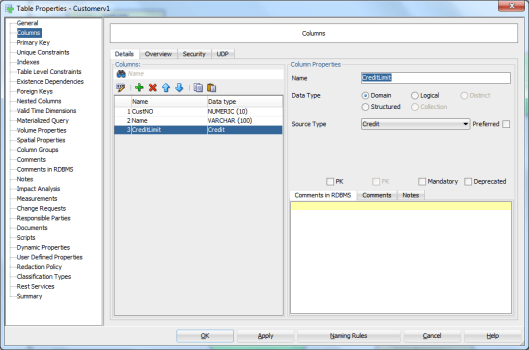
 

pic5

Now the DDLs you get will have all you defined in the Domain: the data type and the constraint:


CREATE TABLE Customers_Test

(

CustNO      NUMBER (10) NOT NULL ,

Name        VARCHAR2 (100) NOT NULL ,

CreditLimit NUMBER (6,2)

) ;

ALTER TABLE Customers_Test ADD CHECK ( CreditLimit BETWEEN 0 AND 100000) ;


This is all great but what if I want to define a check constraint with other kind of definition but a list or a range?

Defining a Check Constraint

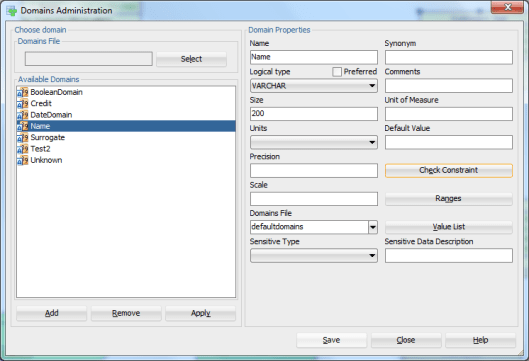
Let’s define a Domain Name.
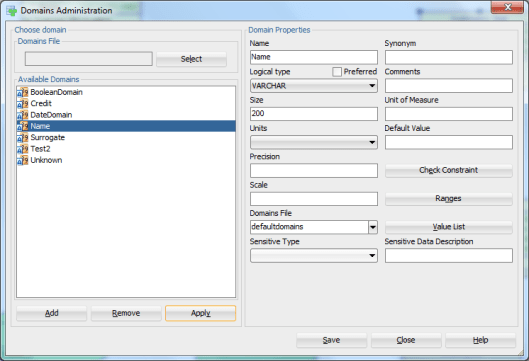
pic6

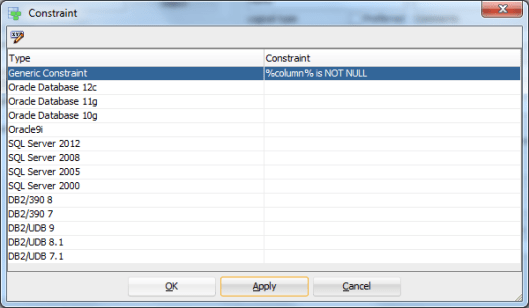
Whenever this Domain is used we want the column to be NOT NULL. Press Check Constraint.

If you want to define different constraints to different RDBMS types you can do that by clicking the Constraint field next to the technology chosen. If you want to define a generic constraint, select the Constraint field next to Generic Constraint.
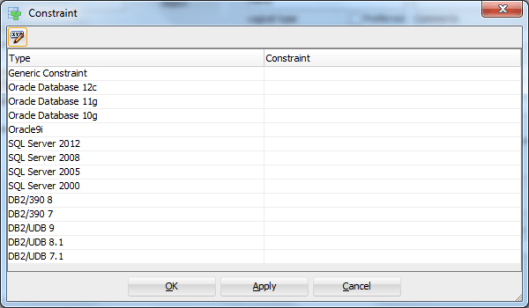
pic7


Define the constraint using %element% notation:

pic8

Press OK.


pic9

Then Apply and OK.

pic10

Apply and Save.


Define an attribute or a column with a Domain Name.
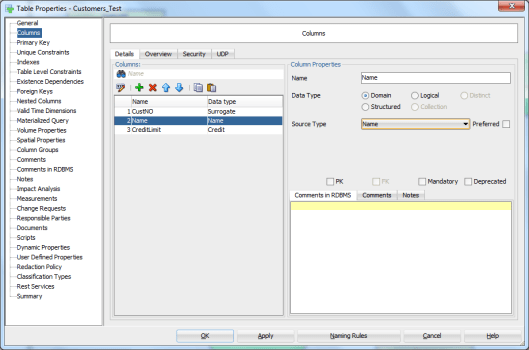
pic11

And the DDLs


CREATE TABLE Customers_Test

(

CustNO      NUMBER (16) NOT NULL ,

Name        VARCHAR2 (200) ,

CreditLimit NUMBER (6,2)

) ;

ALTER TABLE Customers_Test ADD CHECK ( Name IS NOT NULL) ;


This might be a bit silly example but just to show how you can define more complex constraints using a variable (%column% in our example).

NOTE that the constraint defined in our example is different from defining a column mandatory (ALTER TABLE Customers_Test MODIFY (Name NOT NULL)) but the effect is the same: you cannot insert a row in that table without giving a value for the column Name.

Name             Null                Type

———– ——– ————-

CUSTNO      NOT NULL     NUMBER(16)

NAME                                    VARCHAR2(200)

CREDITLIMIT                      NUMBER(6,2)


In User_Constraints view you will find a constraint defining this column NOT NULL:

“HELI”   “SYS_C0014723”               “C”         “CUSTOMERS_TEST”      ” Name IS NOT NULL”    ” Name IS NOT NULL”    “”                “”            “”            “ENABLED”         “NOT DEFERRABLE”         “IMMEDIATE”    “VALIDATED”     “GENERATED NAME”                “”            “”            10.05.2016           “”            “”            “”            “”            3


And you cannot add a row without any value to the Name column:

  1. 00000 – “check constraint (%s.%s) violated”

*Cause:    The values being inserted do not satisfy the named check

*Action:   do not insert values that violate the constraint.


NOTE: You can also define a Default Value for a Domain. And if you have defined a Value List for that Domain the value can be chosen from that list.
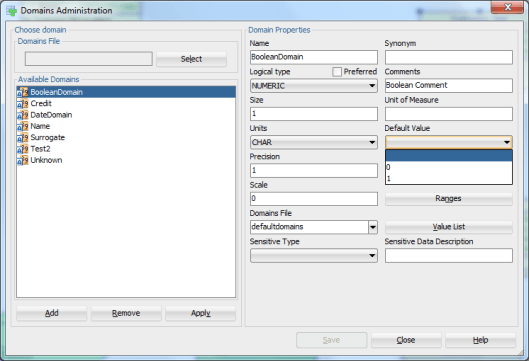
pic12

CREATE TABLE Orders_Test
(
Customer_CustNO NUMBER (10) NOT NULL ,
OrderNo         NUMBER (10) NOT NULL ,
Invoiced        NUMBER (1) DEFAULT 0
) ;


Data Modeler 4.1.3 is OUT

23 Wednesday Dec 2015

Posted by Helifromfinland in Data Modeler

≈ 1 Comment

The development team has been busy! 4.1.3 is now out and plenty of bugs fixed.

http://www.oracle.com/technetwork/developer-tools/datamodeler/overview/index.html

Bugs fixed (from the download pages):

22350565 String index out of bounds exception while importing structured type method bodies
22311829 Table report generating duplicate FK columns
22350611 Cannot select relationship/foreign key line
22339253 Change request report does not generate data in the report
22187312 Error when running design rules using Data Modeler version 4.1.2.895

Data Modeler 4.1.2.1.899 is out!

03 Thursday Dec 2015

Posted by Helifromfinland in Data Modeler

≈ 1 Comment

Data Modeler 4.1.2.1.899 is out with plenty of important bug fixes. Go and try!


http://www.oracle.com/technetwork/developer-tools/datamodeler/downloads/index.html

From the download pages:

Oracle SQL Developer Data Modeler 4.1.2.1: Bugs Fixed

Date: December 2015

This list contains only a selection of higher priority bugs, customer bugs and issues raised by the community on the OTN Forum since the release of version 4.1.2.

22109015 Table structure not available in browser for versioned designs
22120662 “Oracle errors to mask” tab is always disabled
22112910 Table has columns with undefined security properties’ for xmltype column
22186607 Constraint definition is missing in ddl when custom ddl script is used
22187312 Error when running design rules using Data Modeler version 4.1.2.895

Cheers

Heli

Oracle SQL Developer Data Modeler 4.1.2

04 Wednesday Nov 2015

Posted by Helifromfinland in Data Modeler

≈ 1 Comment

The best news on Friday Oct 23rd was that version 4.1.2 of Data Modeler came out! We were really waiting for this release because of some bugs on 4.1.1 that made our lives quite difficult. Thank you development team for fixing everything so quickly and releasing 4.1.2 so fast!

If you have not downloaded it yet, this is the place to do it:

http://www.oracle.com/technetwork/developer-tools/datamodeler/downloads/index.html

Some bug fixes (http://www.oracle.com/technetwork/developer-tools/datamodeler/downloads/data-modeler-bugsfixed-v412-2714842.html):

This list contains only a selection of higher priority bugs, customer bugs and issues raised by the community on the OTN Forum since the release of version 4.1.1.

21310122 Interactive DDL for automatically generated Indexes contains an invalid semi-colon
21436619 Different formatting causes Table Check Constraint to be marked as changed
21450718 Missing check constraint ddl (arc constraint) during merge
21471733 Save doesn’t remove deleted foreign keys
21627534 Grant flashback on an oracle table not supported
21617909 Domain can’t be locked without opening design
21487134 Not possible to populate the supertype table without having to populate subtypes
21805334 Journal trigger ddl refers to arbitrary “emp2” table instead of generated table
21417244 Table to view wizard to copy column comments in rdbms to view column
21935378 SVN – processing of outgoing changes is too slow
21935571 Unicode characters in domain definition are changed when save/reopen
21943476 Mandatory fields being reset to optional – model in single file mode

What has changed? Some things from the release notes (http://www.oracle.com/technetwork/developer-tools/datamodeler/downloads/data-modeler-relnotes-v412-2714825.html):

  • “Mozila Rhino” script engine is not distributed with JVM any more. It’s replaced with “Oracle Nashorn” scripting engine. Engine need to be changed in existing scripts.
  • Predefined RDBMS sites are no longer distributed in file defaultRDBMSSites.xml and will be removed from existing versions of that file.
  • Added new logical data type String

    Changed mapping for Oracle 12c for following types:

    • Binary – from BLOB to RAW
    • Boolean – from CHAR to Number

Let the database design work continue!

Cheers

Heli

How to define a PK using Data Modeler?

30 Thursday Jul 2015

Posted by Helifromfinland in Data Modeler, Database design

≈ 7 Comments

Primary Key (PK) identifies uniquely each row in a table. There can never be two tuples with same values in PK.

There are two ways of defining a PK: a natural key or a surrogate key. I would say that if you can find a natural key that is always better. But it is not always possible and therefore we can also use surrogate PKs. Surrogates are usually sequence numbers that has no meaning to the business people, the end users.

Let’s have an example of an entity for all the users in a company.

PK1

PK2

1. Defining a natural PK

What I want is that there will never be more than one user with the same username. If this means that there can NEVER be two with the same username, I would define the PK like this:

PK3

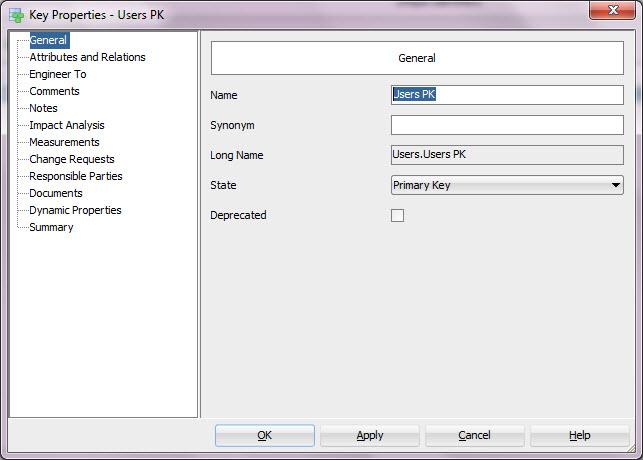
You can see the PK definition from Unique Identifiers tab:

PK4

And by clicking the Properties button (XYZ and a pen) you can see and edit the properties for this unique identifier.

You can for instance change the name

PK5

Or see what attributes or relationships are involved in this PK. You can add or remove attributes or relationships to/from the PK using the arrows pointing to right and left. And you can change the order of the PK elements using the arrows pointing up and down.

PK6

If the requirement would be that there can never be two users at the same time with a same valid username I might think a bit. If I am sure that a pair (Username, Valid) would be enough as a PK, it means that I can only have max two users with the same Username: one with Valid=true and another one with Valid=false, I could define that as the PK, but what happens when the second one needs to be disabled eg. Valid changed to false? Then I would have two tuples with same values in Username and Valid, that would not work because that is my PK. So having a PK with just Username and Valid would not be quite smart. I could also use Created date in PK but would that be smart? No. Having a PK (Username, Valid, Created) would help me to disable a username even though there is already another of the same Username disabled or adding the third user with the same Username but it would not guarantee that only one user would have that Username at a point of time. And that was exactly what the requirement was.

I could add BeginDate and EndDate as attributes:

PK7

But that would not help me because I could not use those attributes in the PK because I should be checking that the two rows are not valid at the same time, eg. comparing the BeginDates and EndDates for all rows having the same Username. Of cause I could check those attributes using PL/SQL and check that only one row is valid at a time but that is not a PK.

No wonder many people end up to the conclusion that the requirement means that there can NEVER be two users with the same Username 🙂 Then the PK (Username) would be sufficient.

But what if the requirement really is that there cannot be more than one at the same point of time? Then I would use surrogate as the PK and use PL/SQL (trigger) for checking the rest.

2. Defining a surrogate PK

There are two ways to define a surrogate PK: manually or automatically.

If I want to create it manually, I simply define an attribute for it and define it as the PK. My recommendation is that if this is the way you want to work, start by defining a Domain for surrogates and always use that when defining a surrogate PK manually. Otherwise defining a surrogate PK manually is done just like I explained earlier on Defining a natural PK.

You can also define a surrogate PK automatically. In entity properties enable Create Surrogate Key and when you engineer to relational model, this surrogate key and the surrogate column are created automatically.

PK8

If using surrogate keys is the preferred way of working for you, you might consider enabling that property so that the default would be Create Surrogate Key enabled.

PK9

Remember that you can define the naming standard for the surrogate key and the column created in Design Properties (right-click on the Design name and select Properties):

PK10

This was a quick look to PKs. A natural key is always the best and being able to define one you must know the requirements and understand them. If a natural key does not work, then a surrogate key is an option.

Which tables are partitioned? Which tables are index organized?

16 Tuesday Jun 2015

Posted by Helifromfinland in Data Modeler

≈ 1 Comment

This requirement calls for reporting…

Start Search by right-clicking the physical model name in Browser and by selecting Search.

Fig1

Select Advanced Mode and select Table as Object Type.

Fig2

Press Add Property.

Select Partitioned as a Property and type “yes” to the value field.

Fig3

Press Search.

Fig4

Now you have a list of partitioned tables in physical model Oracle 12c.

Maybe you want to have a nice report of them?

Press Report.

Fig5

You can generate the report as it is

Fig8

or you can use Custom Templates.

Fig6

Fig7

How about my IOTs?

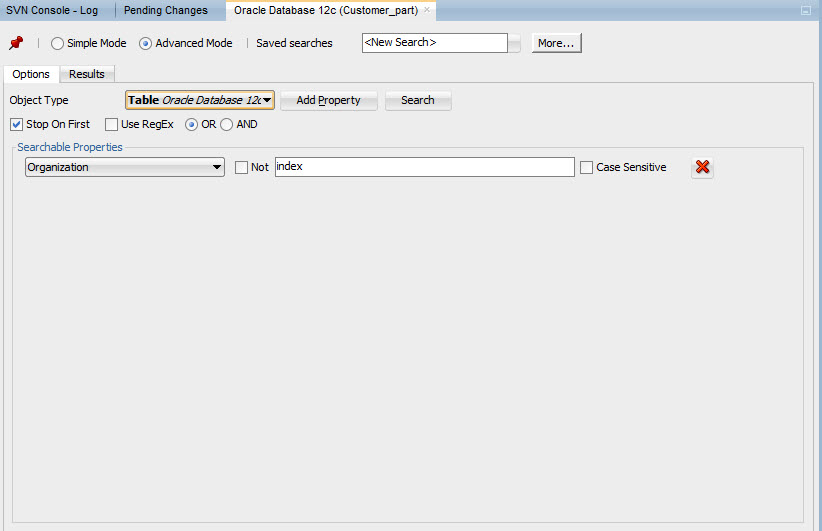
In Advanced Mode select Organization as Property and type “Index” on value field.

Fig9

Press Search. Press Report. And either generate the report as is or use one of your Templates.

Fig10

Fig11

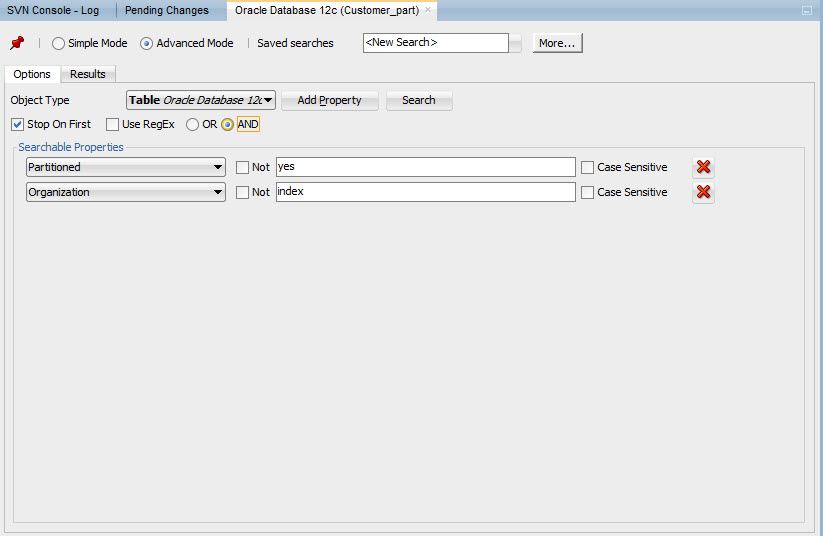
And if I want to have tables that are both partitioned AND index organized?

Fig12

First select Partitioned=yes. Then press Add Property again and select Organization=index. Remember to set the logical operator to AND. Then press Search.

Fig13

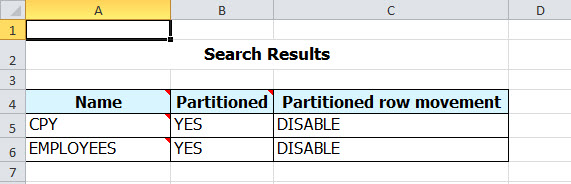
And generate the report wanted.

Note: If you run the report in Microsoft Excel format you are able to edit the content in Excel and then upload it back to Data Modeler.

Fig14

Oracle SQL Developer Data Modeler for Database Design Mastery available in EMEA!

12 Friday Jun 2015

Posted by Helifromfinland in Data Modeler, Database design, General

≈ 6 Comments

My book is finally available in EMEA:

Amazon
http://www.amazon.co.uk/Oracle-Developer-Modeler-Database-Mastery/dp/0071850090/ref=sr_1_1?s=books&ie=UTF8&qid=1434007533&sr=1-1&keywords=9780071850094

M-H Education EMEA
http://www.mheducation.co.uk/9780071850094-emea-oracle-sql-developer-data-modeler-for-database-design-mastery

← Older posts
Newer posts →

Subscribe

  • Entries (RSS)
  • Comments (RSS)

Archives

  • December 2025
  • October 2023
  • October 2022
  • October 2021
  • April 2020
  • October 2019
  • October 2018
  • June 2018
  • December 2017
  • October 2017
  • September 2017
  • July 2017
  • April 2017
  • March 2017
  • February 2017
  • January 2017
  • December 2016
  • November 2016
  • October 2016
  • September 2016
  • August 2016
  • July 2016
  • June 2016
  • May 2016
  • April 2016
  • March 2016
  • February 2016
  • December 2015
  • November 2015
  • October 2015
  • September 2015
  • August 2015
  • July 2015
  • June 2015
  • May 2015
  • April 2015
  • March 2015
  • January 2015
  • December 2014
  • November 2014
  • October 2014
  • September 2014
  • August 2014
  • June 2014
  • May 2014
  • April 2014
  • January 2014
  • December 2013
  • November 2013

Categories

  • Data Modeler
  • Database design
  • Events
  • General
  • Machine learning and AI
    • AI Agents
  • Oracle
  • SQL Developer

Meta

  • Create account
  • Log in

Blog at WordPress.com.

Privacy & Cookies: This site uses cookies. By continuing to use this website, you agree to their use.
To find out more, including how to control cookies, see here: Cookie Policy
  • Subscribe Subscribed
    • HeliFromFinland
    • Join 53 other subscribers
    • Already have a WordPress.com account? Log in now.
    • HeliFromFinland
    • Subscribe Subscribed
    • Sign up
    • Log in
    • Report this content
    • View site in Reader
    • Manage subscriptions
    • Collapse this bar
 

Loading Comments...