So far I have written two books, the first one by myself and the second one with good friends. If you are interested check from Amazon:
My Books
29 Friday Jul 2016
Posted in Data Modeler, Database design, Oracle

29 Friday Jul 2016
Posted in Data Modeler, Database design, Oracle
So far I have written two books, the first one by myself and the second one with good friends. If you are interested check from Amazon:
06 Thursday Aug 2015
Posted in Database design
Finally the work of a database designer will be recognized! Oracle has announced the Oracle Database Developer Choice Awards nomination and one of the categories makes me very, very happy: DB Design.
It has been too long that the work of a database designer has been ignored. If you know a great database designer, somebody who has been speaking up for the importance of database design even in bad times or somebody who has been helping you with database designing, go and nominate him/her NOW: https://community.oracle.com/community/database/awards
Thank you Oracle, for understanding the importance of database designing and promoting it!
30 Thursday Jul 2015
Posted in Data Modeler, Database design
Primary Key (PK) identifies uniquely each row in a table. There can never be two tuples with same values in PK.
There are two ways of defining a PK: a natural key or a surrogate key. I would say that if you can find a natural key that is always better. But it is not always possible and therefore we can also use surrogate PKs. Surrogates are usually sequence numbers that has no meaning to the business people, the end users.
Let’s have an example of an entity for all the users in a company.


1. Defining a natural PK
What I want is that there will never be more than one user with the same username. If this means that there can NEVER be two with the same username, I would define the PK like this:

You can see the PK definition from Unique Identifiers tab:

And by clicking the Properties button (XYZ and a pen) you can see and edit the properties for this unique identifier.
You can for instance change the name
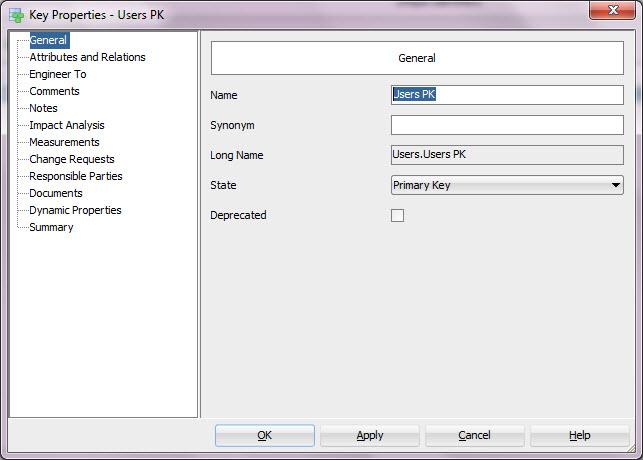
Or see what attributes or relationships are involved in this PK. You can add or remove attributes or relationships to/from the PK using the arrows pointing to right and left. And you can change the order of the PK elements using the arrows pointing up and down.

If the requirement would be that there can never be two users at the same time with a same valid username I might think a bit. If I am sure that a pair (Username, Valid) would be enough as a PK, it means that I can only have max two users with the same Username: one with Valid=true and another one with Valid=false, I could define that as the PK, but what happens when the second one needs to be disabled eg. Valid changed to false? Then I would have two tuples with same values in Username and Valid, that would not work because that is my PK. So having a PK with just Username and Valid would not be quite smart. I could also use Created date in PK but would that be smart? No. Having a PK (Username, Valid, Created) would help me to disable a username even though there is already another of the same Username disabled or adding the third user with the same Username but it would not guarantee that only one user would have that Username at a point of time. And that was exactly what the requirement was.
I could add BeginDate and EndDate as attributes:

But that would not help me because I could not use those attributes in the PK because I should be checking that the two rows are not valid at the same time, eg. comparing the BeginDates and EndDates for all rows having the same Username. Of cause I could check those attributes using PL/SQL and check that only one row is valid at a time but that is not a PK.
No wonder many people end up to the conclusion that the requirement means that there can NEVER be two users with the same Username 🙂 Then the PK (Username) would be sufficient.
But what if the requirement really is that there cannot be more than one at the same point of time? Then I would use surrogate as the PK and use PL/SQL (trigger) for checking the rest.
2. Defining a surrogate PK
There are two ways to define a surrogate PK: manually or automatically.
If I want to create it manually, I simply define an attribute for it and define it as the PK. My recommendation is that if this is the way you want to work, start by defining a Domain for surrogates and always use that when defining a surrogate PK manually. Otherwise defining a surrogate PK manually is done just like I explained earlier on Defining a natural PK.
You can also define a surrogate PK automatically. In entity properties enable Create Surrogate Key and when you engineer to relational model, this surrogate key and the surrogate column are created automatically.

If using surrogate keys is the preferred way of working for you, you might consider enabling that property so that the default would be Create Surrogate Key enabled.

Remember that you can define the naming standard for the surrogate key and the column created in Design Properties (right-click on the Design name and select Properties):

This was a quick look to PKs. A natural key is always the best and being able to define one you must know the requirements and understand them. If a natural key does not work, then a surrogate key is an option.
12 Friday Jun 2015
Posted in Data Modeler, Database design, General
My book is finally available in EMEA:
M-H Education EMEA
http://www.mheducation.co.uk/9780071850094-emea-oracle-sql-developer-data-modeler-for-database-design-mastery
22 Friday May 2015
Posted in Data Modeler, Database design
Creating journaling tables is very easy with Oracle SQL Developer Data Modeler.
1. If you have not done so yet copy the file dr_custom_scripts.xml from datamodeler\datamodeler\types\ to your Default System Types Directory. Now you will have the journaling script ready for Data Modeler to use.
If you do not remember where your Default System Types Directory is, go and check from Preferences:
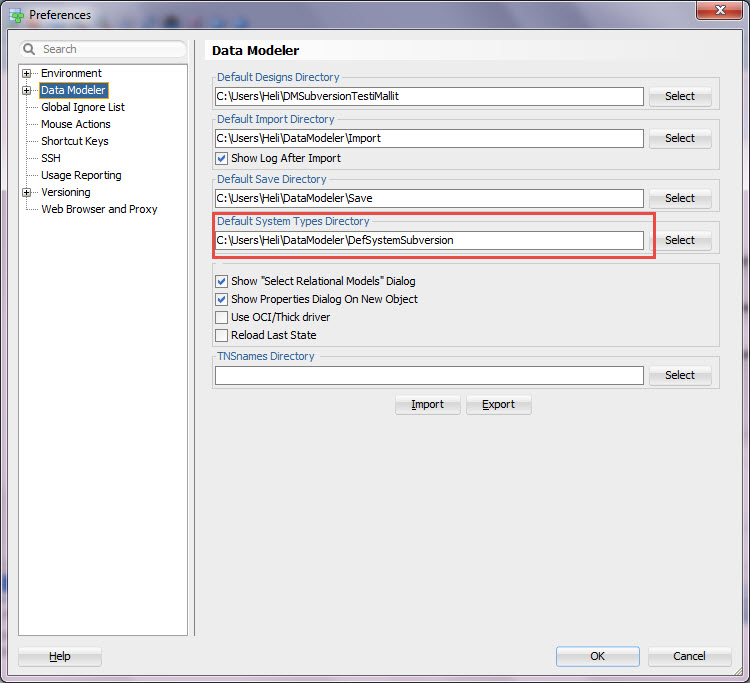
2. If you want to test the script or change it, go to Table DDL Transformations:

Select the script Journal tables. Test by pressing the Test button and Save any changes by pressing the Save.

3. Generate the journal tables
Start by selecting Export, DDL File from File Menu.

Select the script and tables you want to create the journal table in Include Table DDL Scripts tab:
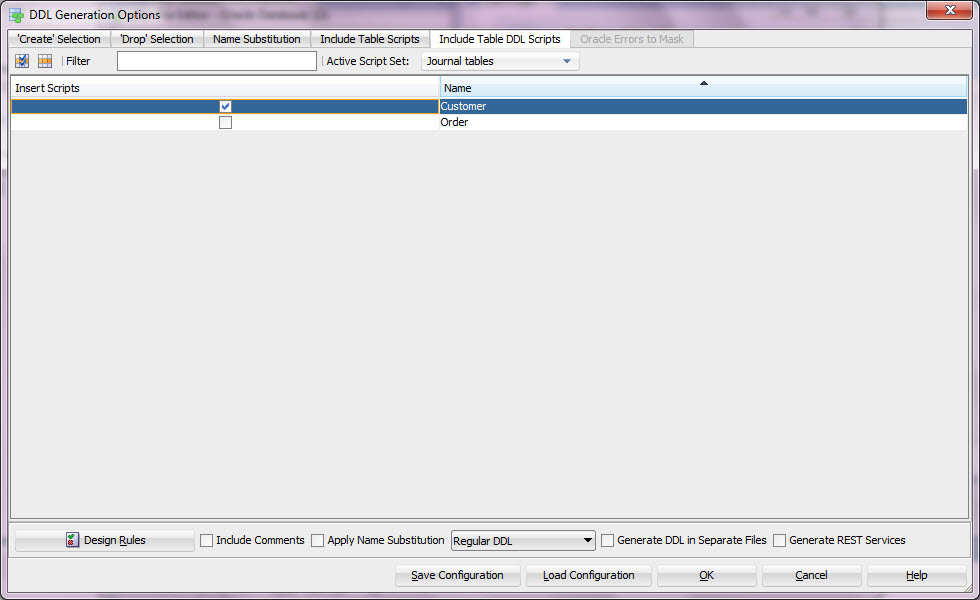
Check the SQL generated:

If you are happy with it just save the DDL file.
Creating journaling tables could not be easier than this 🙂
13 Wednesday May 2015
Posted in Data Modeler, Database design
You might want to see an older version of your database design. Maybe to get the DDLs to create a database of that version or maybe to compare to another version of the database design or the data dictionary.
How to get that version from Subversion?
First select Team, Check Out…
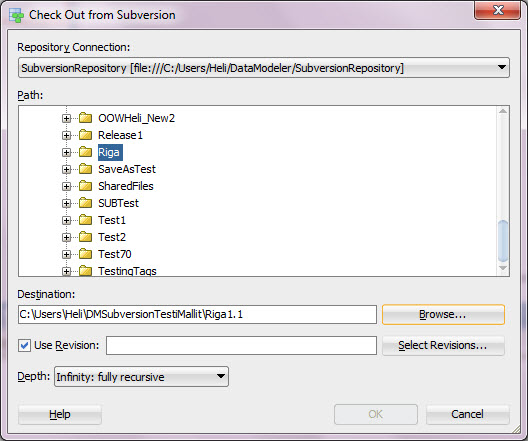
Enable Use Revision and press Select Revisions…

Select the revision that matches your version and press OK.
Open the design from the working directory.

Maybe you would like to get the DDLs to create a database of version 1.1?
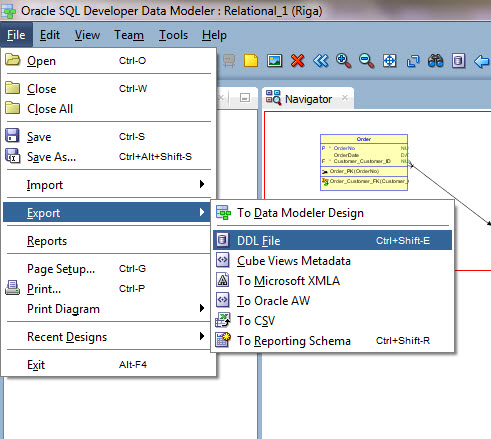
Select File, Export, DDL File.
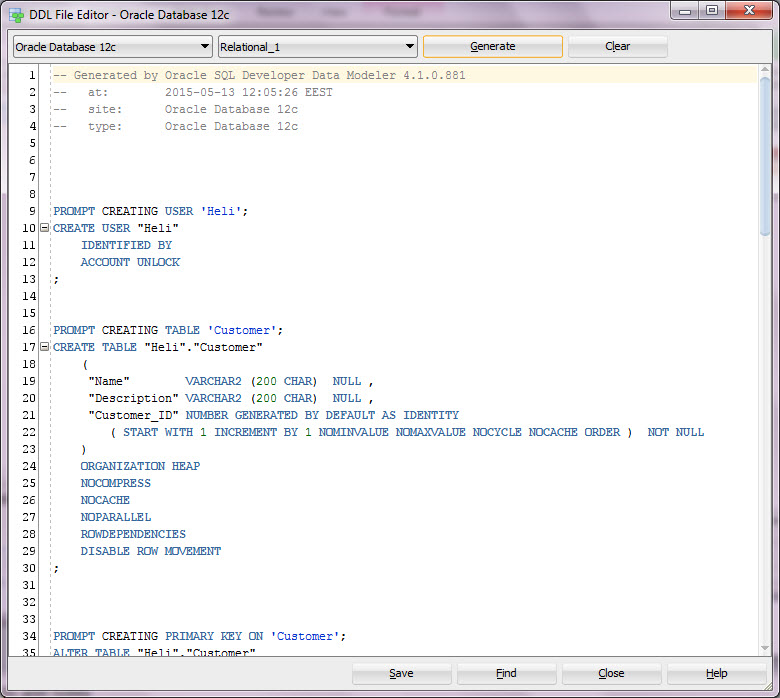
Select the RDBMS Site wanted (for the SQL syntax).

Select the elements you want in the DDL.

See the SQL and if you like it press Save.
Run the saved SQL script to your database.
Now you have a design of version 1.1 and a database with version 1.1 structures.
10 Tuesday Jun 2014
Posted in Database design
Today I passed the certification test for Data Vault 2.0 professionals organised by Daniel Linstedt. I am so proud!
24 Thursday Apr 2014
Posted in Database design
Short answer: it depends.
At first I would say it is an attribute but…
if you need to:
– have many different kinds of phone numbers and you cannot say how many (0-n) and maybe the type of the number varies in different cases (home number for a person, office number for a company, fax number for both) and maybe the types for phone number do not remain the same
– have history data for the numbers (which number was valid at certain time)
or something similar.
You might actually have an entity in hands.
Or if you know there might be max four phone numbers but two of them are mandatory, we come back to the conclusion it is an attribute.
So it depends on the requirements weather phone number is an attribute or an entity.
18 Friday Apr 2014
Posted in Database design
Short answer: no.
Why? Well I can give you at least 10 reasons but just to start with….
– social security number (SSN) is not unique, at least not world wide
– it does not identify a person (for instance my father has two social security numbers, exceptional but possible)
– it can be changed: you come to another country and are given a temporary SSN. You get the citizenship and get the real one. Changed. There are plenty of cases when the SSN is changed.
– it is not something you can define yourself, it comes from another system and is controlled by other organization and their rules. What if they change the rules? Do not have PKs from another system’s data (history data etc)
– it is many times defined as sensitive data. It will be quit a job to get reduction or masking done to all the columns in child tables.
etc.
I prefer natural primary keys over surrogates but social security number is not one. So please save your time and energy and do not define SSN as a primary key.
 HeliFromFinland