Sensitive Data

You can also design your sensitive data using Data Modeler.

In table properties you can define a redaction policy for the table:
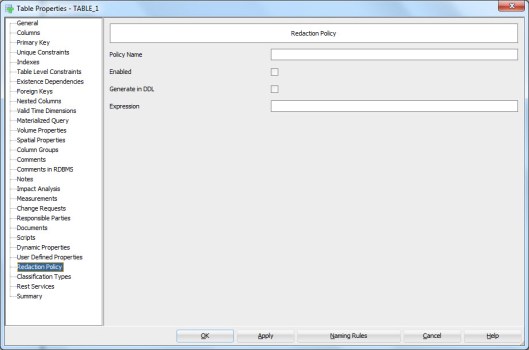
REdactionPOlicy

In column properties (double-click the column name in table properties or press the XYZ icon) select Security.

Security

In this tab you can design two main categories: Redaction and TSDP (Transparent Sensitive Data Protection).

In Redaction section you can define whether or not the column holds personally identifiable information (PII) (YES/NO), whether or not it holds sensitive information (YES/NO), the masking type used (FULL, NO, PARTIAL, RANDOM, REGEXP) and which masking template to use.

You can define your own masking templates by selecting Mask Templates Administration from Tools Menu:

MaskTemplates


After defining them they will be available in the list. Note that they must be of the same datatype as the column itself and of the same masking type selected to be seen on the list.


In TSDP section you can define the Sensitive Type used and type in the Sensitive Data Description.

You can define new sensitive types by right-clicking the Sensitive Types in Browser and selecting New Sensitive Type.

SensitiveTypes


And now back to the Column Properties and the Security Properties. In TSDP Section we can select a Sensitive Type created as a sensitive type for that column, as well as Masking Type and Mask Template:

SSNDef


You can also define sensitive type for a Domain:

SenTypeName


You can define new TSDP policies by right-clicking the TSDP Policies in the Browser and selecting New TSDP Policy:

TSDPPolicy

They can include Sub Policies:

SubPolicy

with Mask Types and Mask Templates etc.

You can also attach a Sensitive Type to the TSDP Policy:

TSDPSenType


After designing the sensitive data you might want to see a report of it.

The best way to do that is Search and Advanced Mode:

SSNReport

Select Contains sensitive information Property and true.
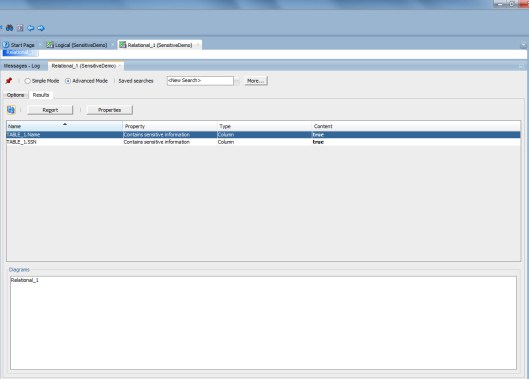
ReportResult

Now you can see all the columns that have been defined to hold sensitive data.

Press Report and select the format type preferred etc.

And here we are…
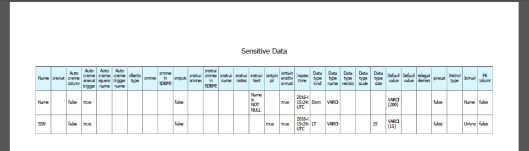
Report


#OUG_SCOT

I am at the Glasgow airport waiting to board my flight to London and then home.

I was attending and speaking at the OUG Scotland event in Glasgow. What a great event it was! I did not even realize how much I have missed the UKOUG events and Scotland! I had so much fun, met old friends and made new ones. Thank you everybody!

I arrived on Wednesday for the ACE dinner organized by Debra Lilley. The food was lovely but what was the best was that this restaurant is famous for its gin collection: they have 60 different gins! They did not know anything about Björn Rost’s speciality Gin Basil Smash but they offered us a Gin Smash which was pretty close to the one Björn makes but had mint in it. Not bad at all!

debra

The event was a one day event on Thursday. I was a very proud panelist on a optimising panel chaired by Jonathan Lewis:

panel

Based on what I heard from the attendees afterwards the panel was really good. I had fun and as usual I did have plenty of opinions 😉

I also gave a session about managing the changes in database structures using Oracle SQL Developer Data Modeler. Thank you for all the questions during and after the session!

I attended several great session during the day and when we finished I was really tired and ready to sleep. But since a good friend of mine, Peter Robson, was there I really wanted to have a dinner and a proper chat with him. He will be visiting Finland very soon! We realized we both like the same band and will go and see their concert in Helsinki in September 🙂

We had a great dinner in an Italian restaurant:

dinner

Kai Yu, thank you for the photos!

What a great event and what a great couple of days in Scotland! Please, UK, vote for “remain”… My travelling would get more difficult if you vote otherwice…


cider

Cheers,

Heli

P.S. They voted “leave” 😦 My flight was delayed almost 2h and I missed my connecting flight. Thanks to Finnair’s superkind customer service (my ticket was a BA ticket!) I made it to the next flight and was home only about 1 h later than originally planned. Still waiting for my bag though…

P.P.S The bag arrived!


How to change the target and the source in comparing with a DDL?

I want to compare a DDL and a design using File|Import|DDL File. I know my design is correct but the comparison always shows the DDL to be correct and suggests me to change the design. How to I tell the tool that my design is correct and I want to alter the database accordingly?

It is very simple. While importing the DDL select “Swap target model”

swapthetarget

Now the comparison will show the design as the source (truth) and the DDL as the target (false). AND it will give you the ALTER DDLs to change the database. Simply press DDL Preview to get those ALTER scripts.


How to sort attributes?

I would like to have my attributes in alphabetical order. Do I need to do it manually or is there a way to do it automatically?

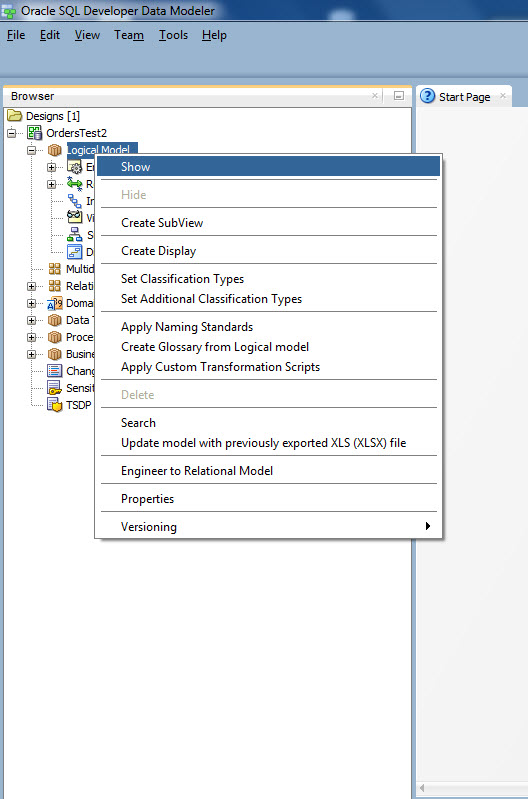
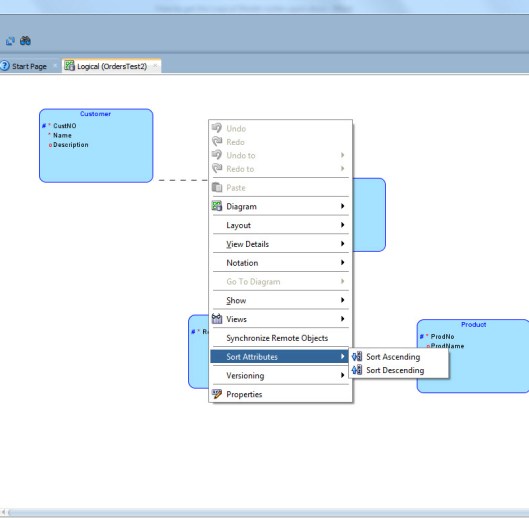
There is a way to do it automatically. Right-click on the Logical Model canvas and select Sort Attributes. You can sort them either ascending or descending.


Sort


But are you sure you want them to be in alphabetic order? Usually it is easier to understand the model if the primary key attributes are first and usually we define the mandatory attributes in the beginning of the list.


Why can’t I see the domains in the list?

I have defined several domains but when I try to use them I cannot see any of them in the list. What is wrong?

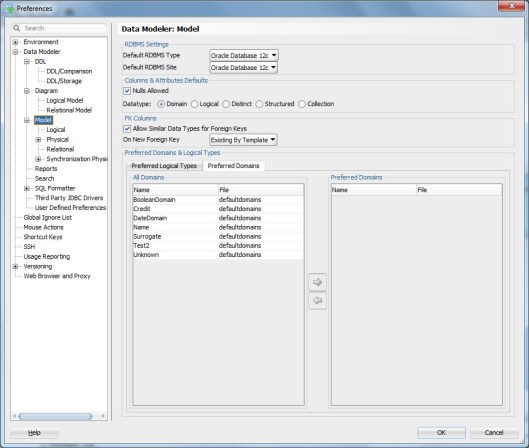
Most likely the reason is that you have the Preferred property enabled for logical datatypes and when you change to domains it stays enabled. You have not defined any domains and preferred domains and that is why the list is empty.

domain

domain2

Either disable Preferred or define the domains as preferred in Preferences.

domain3


Heli’s Tour

I am on my way home after travelling for 10 days. I visited 3 countries and attended 5 events. At the moment I am in Germany waiting to be boarded to my last flight of this tour.

I started my tour with the OTN Cloud Developer Challenge in Leiden, Netherlands. Then I attended the AMIS25 celebrations with two talks: My fav SQL Developer features and Managing changes in database structures. After that I flew to Sofia, Bulgaria where I drove to Borovets for the BGOUG event. At the BGOUG I gave two talks: one about Big Data and the second one about my fav SQL Developer features. After BGOUG I had one day to rest in Sofia (=to do my real work) and then Milena and I drove to Bucharest, Romania. In Romania I attended the EOUC Presidents’ meeting and I gave two talks at the local user group (RoOUG). The first talk was about Big Data and the second one about database security.

I had a great 10 days and I would like to thank all the organizers, attendees and fellow speakers. I am very tired but it really was a great (and efficient J ) tour! Now I will rest a bit before OUG Scotland in Glasgow and KScope16 in Chicago…

How to define a default domain for automatically generated surrogate primary keys?

I always use surrogates as primary key and I use the Data Modeler functionalities to generate them automatically. That is very good but I do not like that it only defines them as NUMERIC. I have defined a domain I would like to use when generating those primary keys but how can I tell Data Modeler to use that domain?


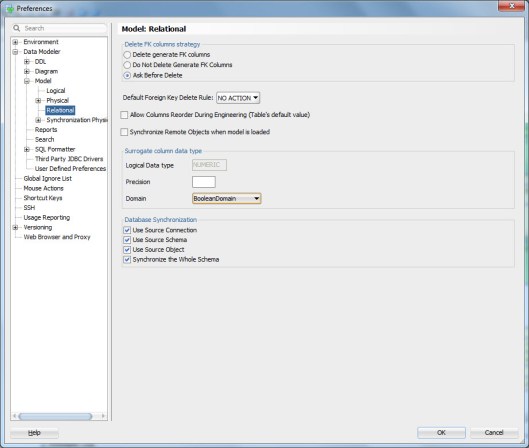
To define the default domain for surrogates go to Preferences, Data Modeler, Model, Relational and select that domain from the list of domains:

defaultdomainforsurrogates


Now when the tool generates a surrogate primary key it will use the domain definition for it.


What is a “Preferred Datatype”?

My colleague is using something she calls Preferred Datatypes when working but I am not sure what she is talking about?

You can define some of the logical datatypes to be your preferred logical datatypes (or preferred domains). In the Preferences you define a list of logical datatypes as preferred logical datatypes like this:

Datatypes1


Then when designing the attributes you enable Preferred and will only see those logical datatypes, that were defined as preferred, in the list.

Datatype2


Now you do not need to go through the whole list of potential logical datatypes, only the ones that you find useful.


#BGOUG

What an amazing BGOUG once again! This time it was held on the mountains in one of the ski resorts. Beautiful place!

BGOUG

I missed the first day because I was travelling from the wonderful #AMIS25 event but I did make it to the dinner and… the dancing. There is no BGOUG without dancing!

BGOUG2

On the second day of BGOUG I gave two sessions. One about Big Data, the area I am doing my research on for the PhD. The room was packed! Not everybody found themselves a seat! Thank you so much for attending! I hope you enjoyed my talk.

The second session was a session APEX Connect asked me to give in April: My fav features of SQL Developer. I was thinking I have nothing special to tell, I am just a regular user not a guru. But already in APEX Connect it turned out that I did have some tips not everybody knew about. And also in BGOUG every attendee convinced me they learned something new in my session. I am so glad! And I am also extremely glad the session was so well attended!

BGOUG3

The weather in the mountains was quite surprising: rainy, windy, sunny,… But we were good because we knew how to forecast the weather, thanks to a local sign:

BGOUG4

Thank you Milena and the team! It was a great event, as always!

— Heli